cancel
Showing results for 
Search instead for 
Did you mean: 

The Power BI Data Visualization World Championships is back! Get ahead of the game and start preparing now! Learn more

Reply
MOMOMO
Frequent Visitor

New table with sum from other tables

I have 3 different tables as follows:

Inventory

forecast

pending 


ProductPackagingInventory
ADrum30
BBulk40
CDrum35


ProductPackagingdateforecast
ADrumSep 20212
BDrumAug 202130
BBulkDec 202150
CBulkJan 2022

8


ProductPackagingdatepending
ADrumJun 20212
BBulkJul 20213
CDrumJul 20215

I want to create a new measure which compares the inventory, forecast, and pending for the same packaging as follows

PackagingInventoryForecastpending
Drum   
Bulk   

I want to export this new measure to a table or a visual on my page so that I would show me the result when I chose a specific product.


how can I do that?

1 ACCEPTED SOLUTION
Anonymous
Not applicable

Hi @MOMOMO 

Please correct me if I wrongly understood your problem .

First you need append the three data tables to become a new table .You can append them in Query Editor .You will get a new table named “Append1” .
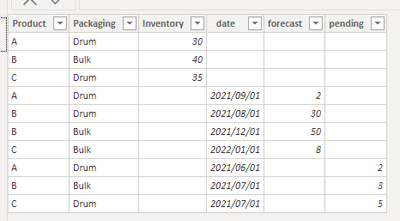
Ailsa-msft_0-1623827553721.png

Then create measures to sum forecast, inventory, pending .

sum forecast = CALCULATE(SUM(Append1[forecast]),ALLEXCEPT(Append1,Append1[Packaging]))

sum inventory = CALCULATE(SUM(Append1[Inventory]),ALLEXCEPT(Append1,Append1[Packaging]))

sum pending = CALCULATE(SUM(Append1[pending]),ALLEXCEPT(Append1,Append1[Packaging]))

Add a table visual with Append1[Packaging] , sum forecast, sum inventory, sum pending , you will get a result like this .
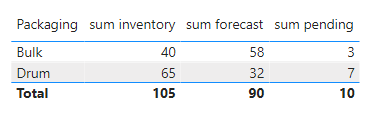
Ailsa-msft_1-1623827553722.png

Add a slicer with the field Append1[Packaging] , and you can through selecting Packaging to return different values for forecast, inventory, pending .

The effect is as shown :
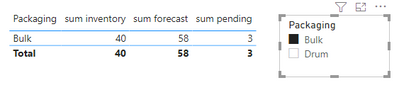
Ailsa-msft_2-1623827553723.png

I have attached my pbix file ,you can refer to it .


Best Regards

Community Support Team _ Ailsa Tao


If this post helps, then please consider Accept it as the solution to help the other members find it more quickly.

View solution in original post

3 REPLIES 3
Anonymous
Not applicable

Hi @MOMOMO 

Please correct me if I wrongly understood your problem .

First you need append the three data tables to become a new table .You can append them in Query Editor .You will get a new table named “Append1” .

Ailsa-msft_0-1623827553721.png

Then create measures to sum forecast, inventory, pending .

sum forecast = CALCULATE(SUM(Append1[forecast]),ALLEXCEPT(Append1,Append1[Packaging]))

sum inventory = CALCULATE(SUM(Append1[Inventory]),ALLEXCEPT(Append1,Append1[Packaging]))

sum pending = CALCULATE(SUM(Append1[pending]),ALLEXCEPT(Append1,Append1[Packaging]))

Add a table visual with Append1[Packaging] , sum forecast, sum inventory, sum pending , you will get a result like this .

Ailsa-msft_1-1623827553722.png

Add a slicer with the field Append1[Packaging] , and you can through selecting Packaging to return different values for forecast, inventory, pending .

The effect is as shown :

Ailsa-msft_2-1623827553723.png

I have attached my pbix file ,you can refer to it .


Best Regards

Community Support Team _ Ailsa Tao


If this post helps, then please consider Accept it as the solution to help the other members find it more quickly.

amitchandak
Super User
Super User

@MOMOMO , create common dimension/s for product and packaging


distinct(union(distinct(inventory[Product]),distinct(packaging[Product]),distinct(forecasting[Product])))

refer my video

https://www.youtube.com/watch?v=Bkf35Roman8


Join them with your tables and analyze them together


How to do in power query

https://www.youtube.com/watch?v=kU2M1LmNvNo

https://www.youtube.com/watch?v=vHuhbvYCiNc

Share with Power BI Enthusiasts: Full Power BI Video (20 Hours) YouTube
Microsoft Fabric Series 60+ Videos YouTube
Microsoft Fabric Hindi End to End YouTube

i can create only one common dimension (packaging) per table and sum per this dimension. However, i cant  filter this by procut because I have one dimension in my table

Helpful resources

Announcements
November Power BI Update Carousel

Power BI Monthly Update - November 2025

Check out the November 2025 Power BI update to learn about new features.

Fabric Data Days Carousel

Fabric Data Days

Advance your Data & AI career with 50 days of live learning, contests, hands-on challenges, study groups & certifications and more!

FabCon Atlanta 2026 carousel

FabCon Atlanta 2026

Join us at FabCon Atlanta, March 16-20, for the ultimate Fabric, Power BI, AI and SQL community-led event. Save $200 with code FABCOMM.

Top Solution Authors
Top Kudoed Authors