Join us at FabCon Atlanta from March 16 - 20, 2026, for the ultimate Fabric, Power BI, AI and SQL community-led event. Save $200 with code FABCOMM.
Register now!Get Fabric Certified for FREE during Fabric Data Days. Don't miss your chance! Request now
I have 3 different tables as follows:
Inventory
forecast
pending
| Product | Packaging | Inventory |
| A | Drum | 30 |
| B | Bulk | 40 |
| C | Drum | 35 |
| Product | Packaging | date | forecast |
| A | Drum | Sep 2021 | 2 |
| B | Drum | Aug 2021 | 30 |
| B | Bulk | Dec 2021 | 50 |
| C | Bulk | Jan 2022 | 8 |
| Product | Packaging | date | pending |
| A | Drum | Jun 2021 | 2 |
| B | Bulk | Jul 2021 | 3 |
| C | Drum | Jul 2021 | 5 |
I want to create a new measure which compares the inventory, forecast, and pending for the same packaging as follows
| Packaging | Inventory | Forecast | pending |
| Drum | |||
| Bulk |
I want to export this new measure to a table or a visual on my page so that I would show me the result when I chose a specific product.
how can I do that?
Solved! Go to Solution.
Hi @MOMOMO
Please correct me if I wrongly understood your problem .
First you need append the three data tables to become a new table .You can append them in Query Editor .You will get a new table named “Append1” .
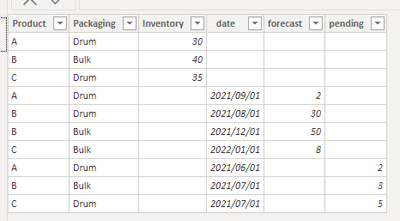
Then create measures to sum forecast, inventory, pending .
sum forecast = CALCULATE(SUM(Append1[forecast]),ALLEXCEPT(Append1,Append1[Packaging]))
sum inventory = CALCULATE(SUM(Append1[Inventory]),ALLEXCEPT(Append1,Append1[Packaging]))
sum pending = CALCULATE(SUM(Append1[pending]),ALLEXCEPT(Append1,Append1[Packaging]))
Add a table visual with Append1[Packaging] , sum forecast, sum inventory, sum pending , you will get a result like this .
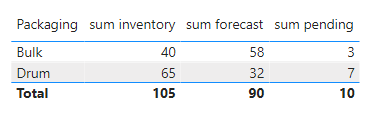
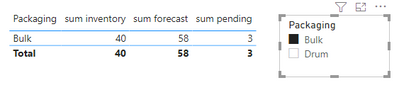
Add a slicer with the field Append1[Packaging] , and you can through selecting Packaging to return different values for forecast, inventory, pending .
The effect is as shown :
I have attached my pbix file ,you can refer to it .
Best Regards
Community Support Team _ Ailsa Tao
If this post helps, then please consider Accept it as the solution to help the other members find it more quickly.
Hi @MOMOMO
Please correct me if I wrongly understood your problem .
First you need append the three data tables to become a new table .You can append them in Query Editor .You will get a new table named “Append1” .
Then create measures to sum forecast, inventory, pending .
sum forecast = CALCULATE(SUM(Append1[forecast]),ALLEXCEPT(Append1,Append1[Packaging]))
sum inventory = CALCULATE(SUM(Append1[Inventory]),ALLEXCEPT(Append1,Append1[Packaging]))
sum pending = CALCULATE(SUM(Append1[pending]),ALLEXCEPT(Append1,Append1[Packaging]))
Add a table visual with Append1[Packaging] , sum forecast, sum inventory, sum pending , you will get a result like this .
Add a slicer with the field Append1[Packaging] , and you can through selecting Packaging to return different values for forecast, inventory, pending .
The effect is as shown :
I have attached my pbix file ,you can refer to it .
Best Regards
Community Support Team _ Ailsa Tao
If this post helps, then please consider Accept it as the solution to help the other members find it more quickly.
@MOMOMO , create common dimension/s for product and packaging
distinct(union(distinct(inventory[Product]),distinct(packaging[Product]),distinct(forecasting[Product])))
refer my video
https://www.youtube.com/watch?v=Bkf35Roman8
Join them with your tables and analyze them together
How to do in power query
i can create only one common dimension (packaging) per table and sum per this dimension. However, i cant filter this by procut because I have one dimension in my table
Check out the November 2025 Power BI update to learn about new features.
Advance your Data & AI career with 50 days of live learning, contests, hands-on challenges, study groups & certifications and more!