Don't miss your chance to take the Fabric Data Engineer (DP-700) exam on us!
Learn moreThe FabCon + SQLCon recap series starts April 14th at 8am Pacific. If you’re tracking where AI is going inside Fabric, this first session is a can't miss. Register now
Thank you for the new Table and Matrix visuals.
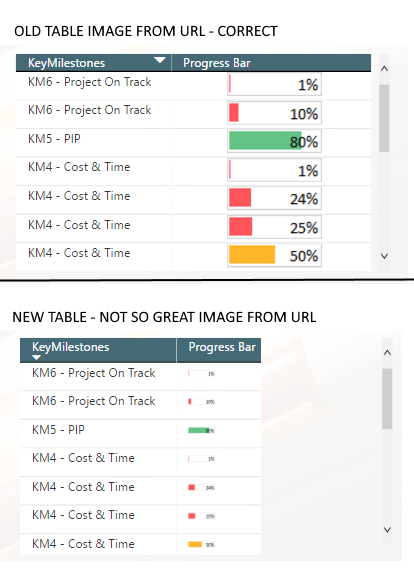
I have two problems with the Image URL format.
1. Scaling. The old Table would scale the image fine but the new is of. See example
2. When the URL isn't valid the old Table would just show an empty cell. The new one shows an icon for no image.
I can see that the old Table and Matrix are removed in the new version of Power BI Desktop, so please fix this 🙂
Best regards
Jeppe
Hi @jeppesal,
#1:
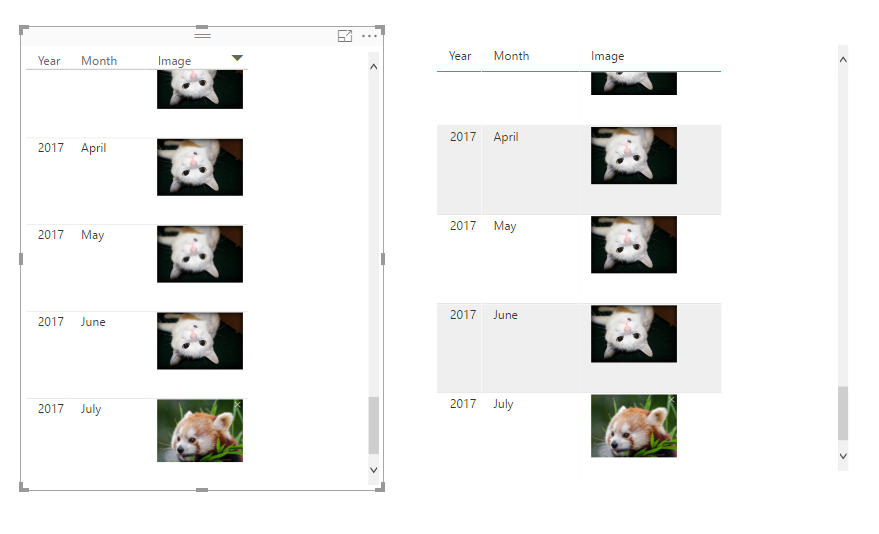
The scaling feature seem not works on new table visual, when I resize the column, it will hide the part fo the image.
#2:
Both table visual and table preview visual show the broken icon when the image url not work.
#3:
Since new table and matrix visual are released in last power bi version, so power bi hide the old version visuals.
BTW, the newest version of power bi still support the old version visuals.
Regards,
Xiaoxin Sheng
If you have recently started exploring Fabric, we'd love to hear how it's going. Your feedback can help with product improvements.
A new Power BI DataViz World Championship is coming this June! Don't miss out on submitting your entry.
Share feedback directly with Fabric product managers, participate in targeted research studies and influence the Fabric roadmap.
| User | Count |
|---|---|
| 53 | |
| 40 | |
| 38 | |
| 19 | |
| 18 |
| User | Count |
|---|---|
| 70 | |
| 69 | |
| 34 | |
| 33 | |
| 30 |