Get certified for free when you join Fabric Data Days 2026 and dive into Fabric, Power BI, SQL, AI, and other essential data skills.
Join nowData Days is here! Join us now for 60+ days of learning, challenges, and connection. Learn more
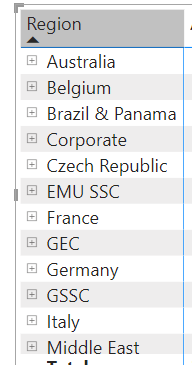
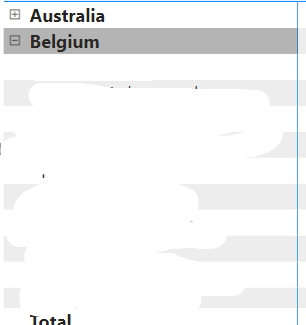
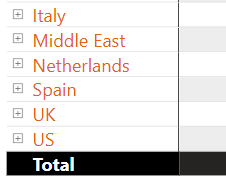
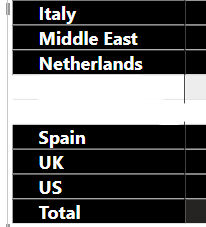
Is there a quick and easy way to turn off the new formatting that is automatically applied in matrix visuals: Row labels and values being automatically bolded and colors changing when rows with multiple values are expanded? A few examples of what I'm talking about. The firs ttwo are the same table, with all top row labels and values automatically being bold when I expand 'Belgium'. The 3rd and 4th are the same visual as well where the background and font colors for the row labels is automatically changed when I expand 'Netherlands'.
Solved! Go to Solution.
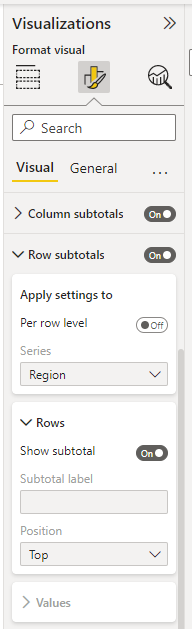
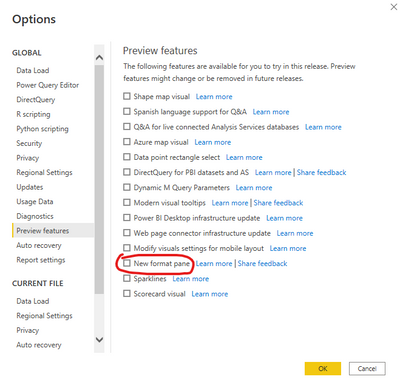
What version of BI Desktop are you using? I can no longer do that in the current version I just installed which is driving me so crazy, see snip below. Am I missing something?
Hi @mterry ,
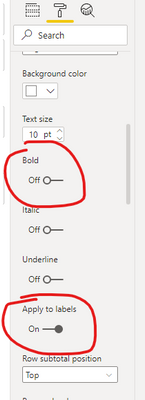
You could diable these options, for example Bold, under Format ->Row subtotals, Grand total and Field formatting.
Best Regards,
Jay
What version of BI Desktop are you using? I can no longer do that in the current version I just installed which is driving me so crazy, see snip below. Am I missing something?
Ok thanks, I did as you said but then also had to ensure that I applied it to labels. Thanks for the help
Don't miss out on Data Days, June 15 through August 7. Learn Fabric, Power BI, SQL, AI and more.
Check out the May 2026 Power BI update to learn about new features.
| User | Count |
|---|---|
| 23 | |
| 23 | |
| 20 | |
| 18 | |
| 14 |
| User | Count |
|---|---|
| 58 | |
| 51 | |
| 40 | |
| 30 | |
| 24 |