Hi there,
Apologies I'm a bit new to Power Query 😑. I'm trying to create a new column that will return a Y or an N depending on whether a date is greater than another date. Both date columns I want to use are in date/time format, but the second date does contain some 'null' values (see below).
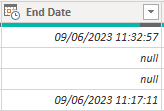
I need to account for these by stating 'not closed' or similar. I've had a go with a couple of scripts to get the datediff working but both give me syntax errors (see screenshot below):
1. SLA Breach = if ('EasyVista Incidents'[End Date] > 'EasyVista Incidents[SLA Target] , "true","false")
2. Table.AddColumn(#"EasyVista Incidents", "Custom", each if, [End Date] > [SLA Target] then true else false)
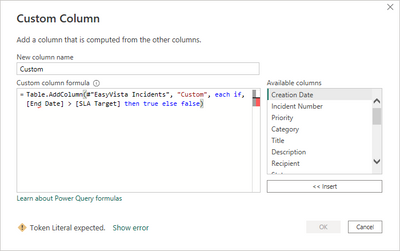
I'm just not quite sure what I;ve done wrong. Any help would be greatly appreciated, TIA 😀


