Morning everyone,
I have experienced this issue previously and have finally decided to ask about it, just in case there is a solution for it.
When I create metrics from previous metrics, and try to add a filter using a previously filtered column, the filter does not work.
I'll put an example:
Total surveys = DISTINCTCOUNT(Test[SurveyID])
Total surveys_Q6 = CALCULATE('Total surveys', Test[Q6] <> BLANK())
Total surveys_Q6_excellent = CALCULATE('Total surveys_Q6 ', Test[Q6] = 10)
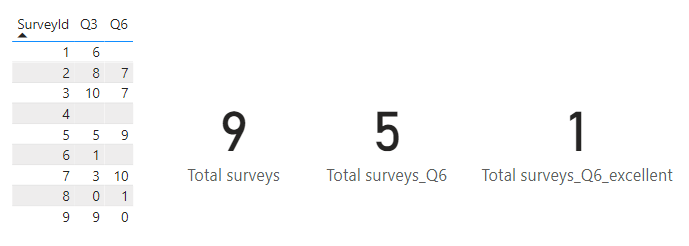
| SurveyId | Q3 | Q6 |
1 | 6 | |
| 2 | 8 | 7 |
| 3 | 10 | 7 |
| 4 | | |
| 5 | 5 | 9 |
| 6 | 1 | |
| 7 | 3 | 10 |
| 8 | 0 | 1 |
| 9 | 9 | 0 |
So, the first 2 metrics are OK. I am simply seeing the total number of surveys we have, and which of those have an answer for question 6. However, when I want to see how many surveys got an excellent score for Q6, the filter is not working (because I previously used it to calculate those that were not blank).
I've tried using ALL, REMOVEFILTERS, etc. And nothing works. At the end, I always end up duplicating a column, or copying the whole formula again (in this case, copying would not be a massive issue, but it is with more complicated metrics).
So, has anyone managed to solve this? What is your workaround? It's a really annoying issue and I can't believe it has not been fixed by microsoft yet.
Thanks in advance!