Get certified for free when you join Fabric Data Days 2026 and dive into Fabric, Power BI, SQL, AI, and other essential data skills.
Join nowJuly 28 - August 9 | Final Round of the Power BI Dataviz World Championships. This is your chance. Learn more
Morning everyone,
I have experienced this issue previously and have finally decided to ask about it, just in case there is a solution for it.
When I create metrics from previous metrics, and try to add a filter using a previously filtered column, the filter does not work.
I'll put an example:
Total surveys = DISTINCTCOUNT(Test[SurveyID])
Total surveys_Q6 = CALCULATE('Total surveys', Test[Q6] <> BLANK())
Total surveys_Q6_excellent = CALCULATE('Total surveys_Q6 ', Test[Q6] = 10)
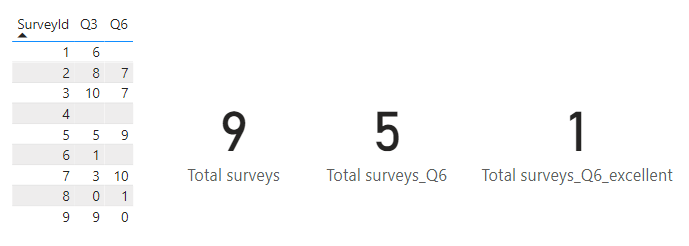
| SurveyId | Q3 | Q6 |
1 | 6 | |
| 2 | 8 | 7 |
| 3 | 10 | 7 |
| 4 | ||
| 5 | 5 | 9 |
| 6 | 1 | |
| 7 | 3 | 10 |
| 8 | 0 | 1 |
| 9 | 9 | 0 |
So, the first 2 metrics are OK. I am simply seeing the total number of surveys we have, and which of those have an answer for question 6. However, when I want to see how many surveys got an excellent score for Q6, the filter is not working (because I previously used it to calculate those that were not blank).
I've tried using ALL, REMOVEFILTERS, etc. And nothing works. At the end, I always end up duplicating a column, or copying the whole formula again (in this case, copying would not be a massive issue, but it is with more complicated metrics).
So, has anyone managed to solve this? What is your workaround? It's a really annoying issue and I can't believe it has not been fixed by microsoft yet.
Thanks in advance!
Solved! Go to Solution.
Hi @Anonymous ,
Please Add Filter() function to the formula.
Total surveys_Q6_excellent = CALCULATE([Total surveys_Q6], FILTER(test, Test[Q6] = 10))
Tips: Using either the operator == or the ISBLANK function to distinguish 0 and blank.
Best Regards,
Jay
Hi @Anonymous ,
Please Add Filter() function to the formula.
Total surveys_Q6_excellent = CALCULATE([Total surveys_Q6], FILTER(test, Test[Q6] = 10))
Tips: Using either the operator == or the ISBLANK function to distinguish 0 and blank.
Best Regards,
Jay
Join us in Barcelona for FabCon and SQLCon, the Fabric, Power BI, SQL, and AI community event. Save €200 with code FABCMTY200.
If you love stickers, then you will definitely want to check out our community sticker challenge, Barcelona edition!
Check out the July 2026 Power BI update to learn about new features.
| User | Count |
|---|---|
| 30 | |
| 28 | |
| 25 | |
| 24 | |
| 16 |
| User | Count |
|---|---|
| 48 | |
| 32 | |
| 17 | |
| 16 | |
| 16 |