cancel
Showing results for 
Search instead for 
Did you mean: 

Try your skills in the Power BI Dataviz World Championship! Round one ends June 26. Join now

Reply
Anonymous
Not applicable

Nested If else statement help

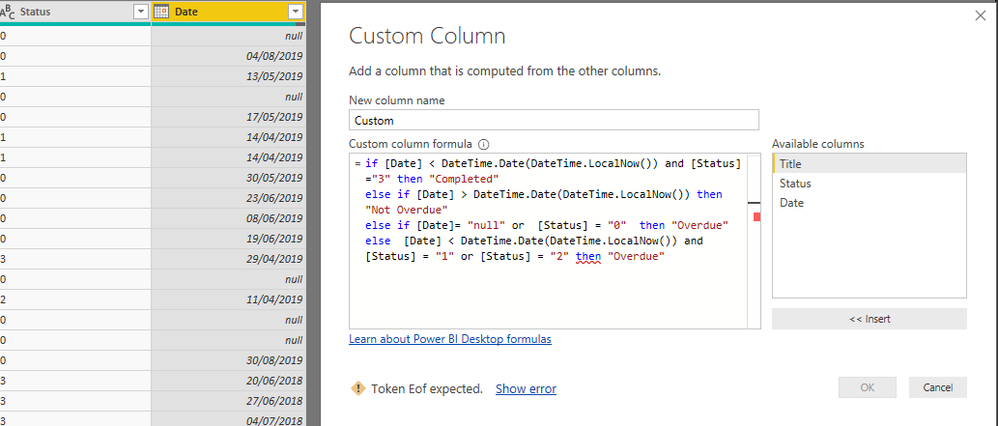
Hi, I am trying to add a custom column and written the following code, but its giving me error(The pic of the table is also attached):-

if [Date] < DateTime.Date(DateTime.LocalNow()) and [Status]="3" then "Completed"
else if [Date] > DateTime.Date(DateTime.LocalNow()) then "Not Overdue"
else if [Date]= "null" or [Status] = "0" then "Overdue"
else [Date] < DateTime.Date(DateTime.LocalNow()) and [Status] = "1" or [Status] = "2" then "Overdue"


I get the error Token eof expected. Would appreciate some help!


Capture.PNG 


1 ACCEPTED SOLUTION
Gordonlilj
Solution Sage
Solution Sage

Hi,


Try something like this

if [Date] < DateTime.Date(DateTime.LocalNow()) and [Status]="3" then "Completed"
else if [Date] > DateTime.Date(DateTime.LocalNow()) then "Not Overdue"
else if [Date]= "null" or [Status] = "0" then "Overdue"
else if [Date] < DateTime.Date(DateTime.LocalNow()) and [Status] = "1" or [Status] = "2" then "Overdue" else ""

View solution in original post

1 REPLY 1
Gordonlilj
Solution Sage
Solution Sage

Hi,


Try something like this

if [Date] < DateTime.Date(DateTime.LocalNow()) and [Status]="3" then "Completed"
else if [Date] > DateTime.Date(DateTime.LocalNow()) then "Not Overdue"
else if [Date]= "null" or [Status] = "0" then "Overdue"
else if [Date] < DateTime.Date(DateTime.LocalNow()) and [Status] = "1" or [Status] = "2" then "Overdue" else ""

Helpful resources

Announcements
Fabric Data Days is here Carousel

Fabric Data Days 2026

Don't miss out on Data Days, June 15 through August 7. Learn Fabric, Power BI, SQL, AI and more.

Power BI DataViz World Championships carousel

Power BI DataViz World Championships - June 2026

A new Power BI DataViz World Championship is coming this June! Don't miss out on submitting your entry.