cancel
Showing results for 
Search instead for 
Did you mean: 

The Power BI Data Visualization World Championships is back! Get ahead of the game and start preparing now! Learn more

Reply
Anonymous
Not applicable

Nested IF statement in custom column

I'm relatively new to PowerBI and having a little trouble wih the syntax for transposing a nested IF statement from Excel. 


My Excel formula reads:

=IF(H2="NULL", "None" , IF(H2>B2,"Late", IF((I2<-7), "Early", "Good" )))


Trying to follow logic from previous posts, but seeminly always coming up with a syntax error.


Any help would be greatly appreciated!


1 ACCEPTED SOLUTION
Vera_33
Resident Rockstar
Resident Rockstar

Hi @Anonymous 


You should provide some sample data in a format which people can copy, otherwise we are doing with our imagination...not sure if you want to add a custom column  in M or DAX, modify the Table name and Column name accordingly

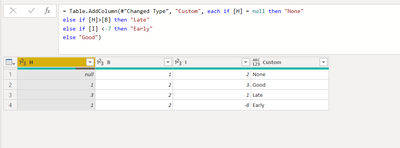
here is M - Power Query Custom Column, you click Add Column -> Custom Column in GUI

Vera_33_0-1637551307100.png

if [H] = null then "None"
else if [H]>[B] then "Late"
else if [I] <-7 then "Early"
else "Good"

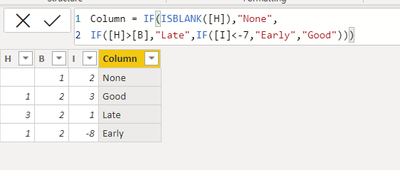
here is DAX Calculated column

Vera_33_1-1637551487688.png

Column = IF(ISBLANK([H]),"None",
IF([H]>[B],"Late",IF([I]<-7,"Early","Good")))


View solution in original post

2 REPLIES 2
Anonymous
Not applicable

Hi @Anonymous ,

Please have a try.

Create a measure.


Measure = var null_ = IF(SELECTEDVALUE('Table'[H2])=BLANK(),"None",IF(SELECTEDVALUE('Table'[H2])>SELECTEDVALUE('Table'[B2]),"late",IF(SELECTEDVALUE('Table'[I2])<-7,"Early","Good")))
return null_


11.PNG

Best Regards

Community Support Team _ Polly


If this post helps, then please consider Accept it as the solution to help the other members find it more quickly.

Vera_33
Resident Rockstar
Resident Rockstar

Hi @Anonymous 


You should provide some sample data in a format which people can copy, otherwise we are doing with our imagination...not sure if you want to add a custom column  in M or DAX, modify the Table name and Column name accordingly

here is M - Power Query Custom Column, you click Add Column -> Custom Column in GUI

Vera_33_0-1637551307100.png

if [H] = null then "None"
else if [H]>[B] then "Late"
else if [I] <-7 then "Early"
else "Good"

here is DAX Calculated column

Vera_33_1-1637551487688.png

Column = IF(ISBLANK([H]),"None",
IF([H]>[B],"Late",IF([I]<-7,"Early","Good")))


Helpful resources

Announcements
Power BI DataViz World Championships

Power BI Dataviz World Championships

The Power BI Data Visualization World Championships is back! Get ahead of the game and start preparing now!

December 2025 Power BI Update Carousel

Power BI Monthly Update - December 2025

Check out the December 2025 Power BI Holiday Recap!

FabCon Atlanta 2026 carousel

FabCon Atlanta 2026

Join us at FabCon Atlanta, March 16-20, for the ultimate Fabric, Power BI, AI and SQL community-led event. Save $200 with code FABCOMM.