Join us at FabCon Atlanta from March 16 - 20, 2026, for the ultimate Fabric, Power BI, AI and SQL community-led event. Save $200 with code FABCOMM.
Register now!The Power BI Data Visualization World Championships is back! Get ahead of the game and start preparing now! Learn more
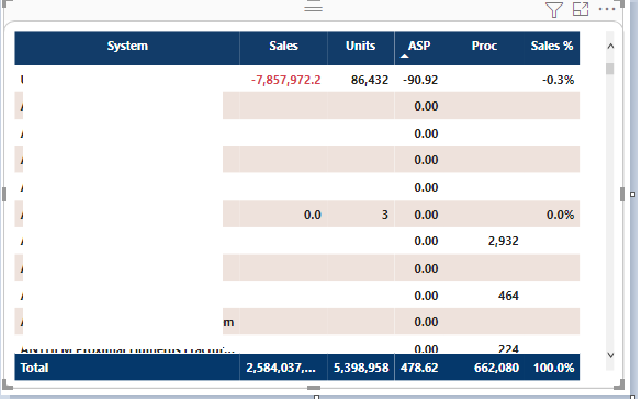
I had created a measure which was
So whenever the item qty is 0 or no value is value then ASP appears as 0. But the user does not want to see those systems which has no values at all.
If we put a visual filter not to show ASP as 0 then all the records where maybe other values such as sales, units are there for the system but asp is 0 then those records are also not shown.
Is there any other way to get this result.
Solved! Go to Solution.
Hi, @Avivek
Please try the below.
newmeasure =
DIVIDE ( [Sales Amount], SUM ( Sales[Item Qty] ), blank())
Hi, My name is Jihwan Kim.
If this post helps, then please consider accept it as the solution to help other members find it faster, and give a big thumbs up.
Linkedin: https://www.linkedin.com/in/jihwankim1975/
Hi, @Avivek
Please try the below.
newmeasure =
DIVIDE ( [Sales Amount], SUM ( Sales[Item Qty] ), blank())
Hi, My name is Jihwan Kim.
If this post helps, then please consider accept it as the solution to help other members find it faster, and give a big thumbs up.
Linkedin: https://www.linkedin.com/in/jihwankim1975/
Check out the November 2025 Power BI update to learn about new features.
Advance your Data & AI career with 50 days of live learning, contests, hands-on challenges, study groups & certifications and more!