Join us at FabCon Atlanta from March 16 - 20, 2026, for the ultimate Fabric, Power BI, AI and SQL community-led event. Save $200 with code FABCOMM.
Register now!The Power BI Data Visualization World Championships is back! Get ahead of the game and start preparing now! Learn more
I had created a measure which was
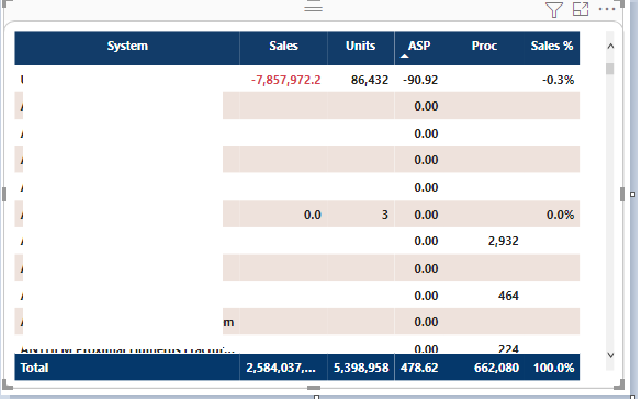
So whenever the item qty is 0 or no value is value then ASP appears as 0. But the user does not want to see those systems which has no values at all.
If we put a visual filter not to show ASP as 0 then all the records where maybe other values such as sales, units are there for the system but asp is 0 then those records are also not shown.
Is there any other way to get this result.
Solved! Go to Solution.
Hi, @Avivek
Please try the below.
newmeasure =
DIVIDE ( [Sales Amount], SUM ( Sales[Item Qty] ), blank())
Hi, My name is Jihwan Kim.
If this post helps, then please consider accept it as the solution to help other members find it faster, and give a big thumbs up.
Linkedin: https://www.linkedin.com/in/jihwankim1975/
Hi, @Avivek
Please try the below.
newmeasure =
DIVIDE ( [Sales Amount], SUM ( Sales[Item Qty] ), blank())
Hi, My name is Jihwan Kim.
If this post helps, then please consider accept it as the solution to help other members find it faster, and give a big thumbs up.
Linkedin: https://www.linkedin.com/in/jihwankim1975/
The Power BI Data Visualization World Championships is back! Get ahead of the game and start preparing now!
Check out the November 2025 Power BI update to learn about new features.
| User | Count |
|---|---|
| 59 | |
| 43 | |
| 42 | |
| 23 | |
| 17 |
| User | Count |
|---|---|
| 190 | |
| 122 | |
| 96 | |
| 66 | |
| 47 |