cancel
Showing results for 
Search instead for 
Did you mean: 

Get Fabric Certified for FREE during Fabric Data Days. Don't miss your chance! Request now

Reply
datanalyst1
New Member

Need to convert qlik expression to DAX

Hello everyone,

I am trying to change a formula from qlik to dax but cannot find a solution.
Qlik expression is this one:

measure = count({<[Order Status] = {'Invoiced','Delivered','Returned'}>} DISTINCT Total [N° Order])

I would need the measure to show the same total in each row of the column.
Can someone please help me?

1 ACCEPTED SOLUTION
v-jingzhang
Community Support
Community Support

Hi @datanalyst1


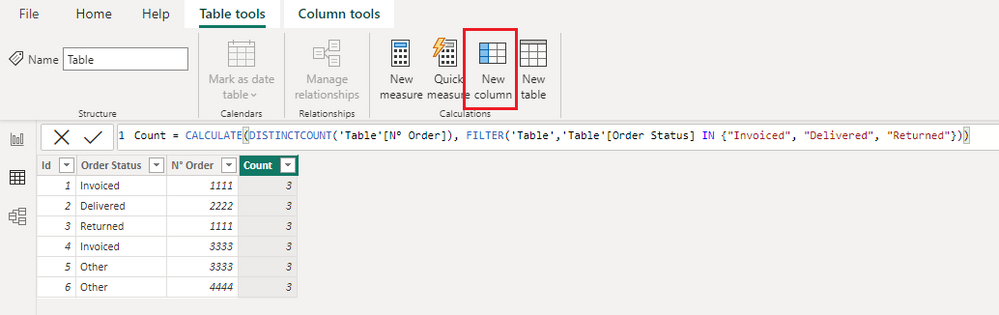
You may create a new column with below DAX. Is this what you want? 

Count = CALCULATE(DISTINCTCOUNT('Table'[N° Order]), FILTER('Table','Table'[Order Status] IN {"Invoiced", "Delivered", "Returned"}))

vjingzhang_0-1675240754696.png


If I don't understand it correctly, can you please provide some sample data and expected output in table format? I don't have experience in Qlik so the sample data and expected output can help me understand your requirement better. 


Best Regards,
Community Support Team _ Jing
If this post helps, please Accept it as Solution to help other members find it.

View solution in original post

2 REPLIES 2
sagrawa
Frequent Visitor

sum(aggr(
(sum(CustTable.AccruedDebit) - sum(CustTable.AccruedCredit)) + sum(CustTable.AccrualAmount), CustTable.%Account_Key))

v-jingzhang
Community Support
Community Support

Hi @datanalyst1


You may create a new column with below DAX. Is this what you want? 

Count = CALCULATE(DISTINCTCOUNT('Table'[N° Order]), FILTER('Table','Table'[Order Status] IN {"Invoiced", "Delivered", "Returned"}))

vjingzhang_0-1675240754696.png


If I don't understand it correctly, can you please provide some sample data and expected output in table format? I don't have experience in Qlik so the sample data and expected output can help me understand your requirement better. 


Best Regards,
Community Support Team _ Jing
If this post helps, please Accept it as Solution to help other members find it.

Helpful resources

Announcements
November Power BI Update Carousel

Power BI Monthly Update - November 2025

Check out the November 2025 Power BI update to learn about new features.

Fabric Data Days Carousel

Fabric Data Days

Advance your Data & AI career with 50 days of live learning, contests, hands-on challenges, study groups & certifications and more!

FabCon Atlanta 2026 carousel

FabCon Atlanta 2026

Join us at FabCon Atlanta, March 16-20, for the ultimate Fabric, Power BI, AI and SQL community-led event. Save $200 with code FABCOMM.

Top Solution Authors
Top Kudoed Authors