cancel
Showing results for 
Search instead for 
Did you mean: 

The Power BI Data Visualization World Championships is back! Get ahead of the game and start preparing now! Learn more

Reply
Musketeers
Regular Visitor

Need to calculate YOY using Quarter-Month field

Hi,

I have two fields in the table: Quarter and Sales.

The quarter field contains the value like Q2 2017, Q1 2017, Q4 2016, Q3 2016.

And Sales column has sales figures.


I have slicer which has Quarter Field as drop down. I need to calculate YoY for sales based on the selected Quarter from filter slicer.

For example, if the user has selected Q1 2017 in slicer from the quarter field, I need to calculate the sum of sales for Q1 2017 and sum of sales for Q1 2016 and then calculate YoY.

Please guide me to achieve this.

1 ACCEPTED SOLUTION
v-huizhn-msft
Microsoft Employee
Microsoft Employee

Hi @Musketeers,

You can create a Calendar Table, and create Quarter-Month column in the table. Create a relationship betweem them. You can create the current and last year using DATEADD function.

LastValue = CONCATENATE(LEFT(Table6[Quarter],3),VALUE(RIGHT(Table6[Quarter],4))-1)

Last = LOOKUPVALUE(Table6[Sales],Table6[Quarter],Table6[LastValue])
Current=SUM(Table[Quarter])
LastYear=CALCULATE(SUM(Table[sale]),DATE(Calendar[Date],-1,Year))


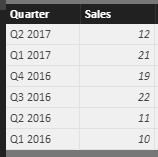
Another solution, I create the following sample table.

1.PNG

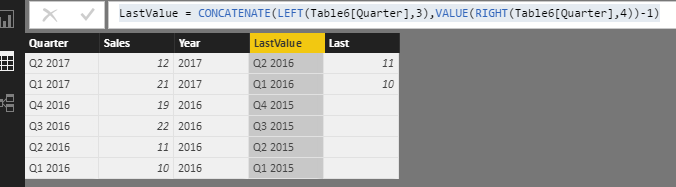
Create the calculated column using the formulas.

LastValue = CONCATENATE(LEFT(Table6[Quarter],3),VALUE(RIGHT(Table6[Quarter],4))-1)

Last = LOOKUPVALUE(Table6[Sales],Table6[Quarter],Table6[LastValue])


2.PNG

Create a slicer including Quarter, select sum(Table[Sale]), sum(Table[Last]) as value, please see the screenshot below.

3.png
Please feel free to ask if you have any other issue.

Best Regards,
Angelia


View solution in original post

2 REPLIES 2
v-huizhn-msft
Microsoft Employee
Microsoft Employee

Hi @Musketeers,

You can create a Calendar Table, and create Quarter-Month column in the table. Create a relationship betweem them. You can create the current and last year using DATEADD function.

LastValue = CONCATENATE(LEFT(Table6[Quarter],3),VALUE(RIGHT(Table6[Quarter],4))-1)

Last = LOOKUPVALUE(Table6[Sales],Table6[Quarter],Table6[LastValue])
Current=SUM(Table[Quarter])
LastYear=CALCULATE(SUM(Table[sale]),DATE(Calendar[Date],-1,Year))


Another solution, I create the following sample table.

1.PNG

Create the calculated column using the formulas.

LastValue = CONCATENATE(LEFT(Table6[Quarter],3),VALUE(RIGHT(Table6[Quarter],4))-1)

Last = LOOKUPVALUE(Table6[Sales],Table6[Quarter],Table6[LastValue])


2.PNG

Create a slicer including Quarter, select sum(Table[Sale]), sum(Table[Last]) as value, please see the screenshot below.

3.png
Please feel free to ask if you have any other issue.

Best Regards,
Angelia


Hi Angelia,

Since the second solution is looking good...so I will go with the second solution.

Thanks for your time and help.


Thanks 

Helpful resources

Announcements
Power BI DataViz World Championships

Power BI Dataviz World Championships

The Power BI Data Visualization World Championships is back! Get ahead of the game and start preparing now!

November Power BI Update Carousel

Power BI Monthly Update - November 2025

Check out the November 2025 Power BI update to learn about new features.

FabCon Atlanta 2026 carousel

FabCon Atlanta 2026

Join us at FabCon Atlanta, March 16-20, for the ultimate Fabric, Power BI, AI and SQL community-led event. Save $200 with code FABCOMM.