cancel
Showing results for 
Search instead for 
Did you mean: 

The Power BI Data Visualization World Championships is back! Get ahead of the game and start preparing now! Learn more

Reply
tdanzeisen
Frequent Visitor

Radar chart

Hey everybody,


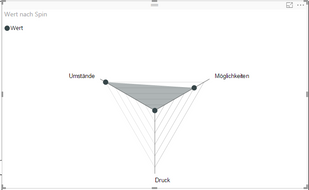
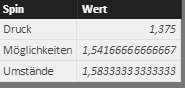
I try to create a radar chart with Power BI. It should look like this:

1.PNG                      2.0.PNG


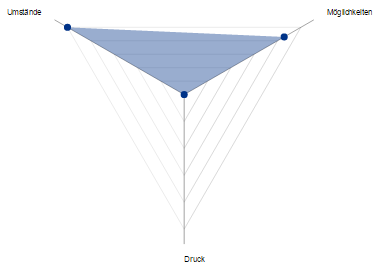
 However, the scale is so small that the point of the category "Druck" is in the middle of  the chart. How can I change that?


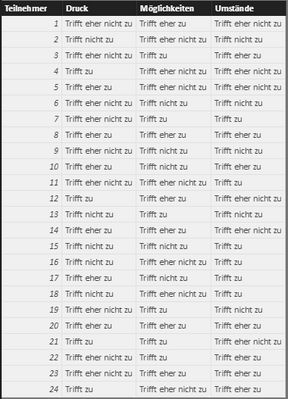
Moreover, the origin data table looks like this:

                                         2.PNG

I try to visualize this table with a radar chart. In my imagination the middle point of the radar chart should represent "Trifft nich zu" = 0 and the outward line should represent "Trifft zu" = 3. And then I will illustrate the average decision of the responders to the points "Umstände", "Möglichkeiten" and "Druck". Anybody an idea, how I can implement that?


Best,

Tobias


2 REPLIES 2
v-qiuyu-msft
Community Support
Community Support

Hi @tdanzeisen,


If seems you place the Spin in Category and Wert in Y Axis of the Radar chart, the result what you get is expected. It has nothing to do with the original data table. You can take a look at the sample of that Radar chart.


Best Regards,
Qiuyun Yu

Community Support Team _ Qiuyun Yu
If this post helps, then please consider Accept it as the solution to help the other members find it more quickly.

Hi @v-qiuyu-msft, thank you for your response.


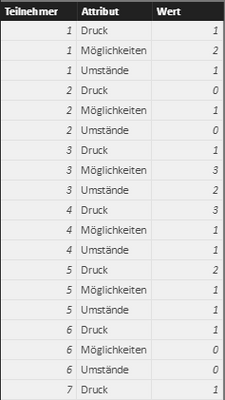
 I transformed the data of the original table into integers: 0 = "Trifft nicht zu", 1 = "Trifft eher nicht zu", 2 = "Triffer eher zu" and 3 = "Trifft zu". Then I unpivot these columns and I got this:


2.PNG

So I could create this Radar Chart with the average values:


1.PNG


So far, all is right. But I want to change the scale of this chart. The middle point should be 0. The first line should be 1, the second 2 and the third 3. But I can't find any options to change this scale. The scale is always automatic and changes if I made a selection. Can anybody help me with this issue?

Helpful resources

Announcements
Power BI DataViz World Championships

Power BI Dataviz World Championships

The Power BI Data Visualization World Championships is back! Get ahead of the game and start preparing now!

December 2025 Power BI Update Carousel

Power BI Monthly Update - December 2025

Check out the December 2025 Power BI Holiday Recap!

FabCon Atlanta 2026 carousel

FabCon Atlanta 2026

Join us at FabCon Atlanta, March 16-20, for the ultimate Fabric, Power BI, AI and SQL community-led event. Save $200 with code FABCOMM.