Don't miss your chance to take the Fabric Data Engineer (DP-600) exam for FREE! Find out how by attending the DP-600 session on April 23rd (pacific time), live or on-demand.
Learn moreNext up in the FabCon + SQLCon recap series: The roadmap for Microsoft SQL and Maximizing Developer experiences in Fabric. All sessions are available on-demand after the live show. Register now
Hello everyone, i am looking for some help in writting a DAX that will give me the following result:
Ideal result = calculate number of activity IDs that have changed status from Not Started to In Progress between Sep 15 and Sep 16.
Ideally i would like to compare this measure for more than two days
Sample Dataset is here:
| Date | Activity ID | Activity Status |
| 15 sep 2021 | A | Not Started |
| 15 sep 2021 | B | Not Started |
| 15 sep 2021 | C | Not Started |
| 15 sep 2021 | D | In Progress |
| 15 sep 2021 | E | In Progress |
| 16 sep 2021 | A | Not Started |
| 16 sep 2021 | B | In Progress |
| 16 sep 2021 | C | In Progress |
| 16 sep 2021 | D | In Progress |
| 16 sep 2021 | E | In Progress |
Solved! Go to Solution.
Hi @viveksharma21 ,
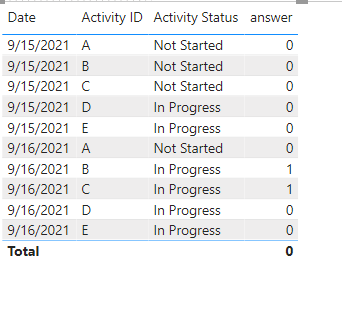
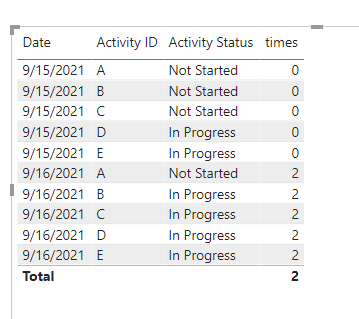
Create two measures Please refer the following formulas.
answer =
var ss =
CALCULATE(MAX('Table'[Activity Status]),FILTER(ALL('Table'),'Table'[Date]=SELECTEDVALUE('Table'[Date])-1&&'Table'[Activity ID]=SELECTEDVALUE('Table'[Activity ID])))
var aa =
IF(ISBLANK(ss),SELECTEDVALUE('Table'[Activity Status]),ss)
var change = IF(SELECTEDVALUE('Table'[Activity Status])=aa,0,1)
return change
times = SUMX(ALLEXCEPT('Table','Table'[Date]),[answer])
If this post helps, then please consider Accept it as the solution to help the other members find it more quickly.
Best Regards
Community Support Team _ Polly
Hi @viveksharma21 ,
Create two measures Please refer the following formulas.
answer =
var ss =
CALCULATE(MAX('Table'[Activity Status]),FILTER(ALL('Table'),'Table'[Date]=SELECTEDVALUE('Table'[Date])-1&&'Table'[Activity ID]=SELECTEDVALUE('Table'[Activity ID])))
var aa =
IF(ISBLANK(ss),SELECTEDVALUE('Table'[Activity Status]),ss)
var change = IF(SELECTEDVALUE('Table'[Activity Status])=aa,0,1)
return change
times = SUMX(ALLEXCEPT('Table','Table'[Date]),[answer])
If this post helps, then please consider Accept it as the solution to help the other members find it more quickly.
Best Regards
Community Support Team _ Polly
maybe I can add some more clarity. I want to finallly see which Activity ID was progressed from "Not Started" to "In Progress"
I want to plot the measure over the dates in column 1. this data will grow over many dates as new schedule comes in.
I am not clear. Please show the expected resul very clearly and also the input that you will be providing via slicers.
Hi,
So in a slicer, will you be selecting 2 dates?
If you have recently started exploring Fabric, we'd love to hear how it's going. Your feedback can help with product improvements.
A new Power BI DataViz World Championship is coming this June! Don't miss out on submitting your entry.
Share feedback directly with Fabric product managers, participate in targeted research studies and influence the Fabric roadmap.
| User | Count |
|---|---|
| 48 | |
| 43 | |
| 39 | |
| 19 | |
| 17 |
| User | Count |
|---|---|
| 69 | |
| 63 | |
| 32 | |
| 30 | |
| 23 |