Join us at FabCon Atlanta from March 16 - 20, 2026, for the ultimate Fabric, Power BI, AI and SQL community-led event. Save $200 with code FABCOMM.
Register now!View all the Fabric Data Days sessions on demand. View schedule
Hi - I've been tasked to set up an output in PowerBI that looks like this. I'm really struggling to try to think about how to structure this data. I have all of the measures needed to calculate these totals, but I can't figure out how to present them. I have a typical star schema with a calendar table.
Basically, for each year Months (1-24), I need to know what % of the total annual order volume was cancelled in that month. I can't think of a way to show each month relative to that year's cohort of orders.
I'm sorry I can't share the file, it's too large and would be impossible to sanitize. I just can't think of how / a way to create something that looks like below.
Yes, I know I skipped months 7-22 to cut down on space.
| Cancelled | Month 1 | Month 2 | Month 3 | Month 4 | Month 5 | Month 6 | Month 23 | Month 24 | Total |
| 2018 orders | 0.5% | 0.2% | 0.7% | 0.8% | 0.8% | 1.0% | 0.8% | 0.7% | 21.6% |
| 2019 orders | 0.5% | 0.3% | 0.7% | 0.8% | 0.6% | 0.9% | 0.8% | 0.6% | 21.2% |
| 2020 orders | 0.5% | 0.2% | 0.7% | 0.8% | 0.8% | 1.0% | 0.8% | 0.7% | 23.1% |
| 2021 orders | 0.5% | 0.2% | 0.7% | 0.8% | 0.8% | 1.0% | 12.0% | ||
| 2022 orders | 0.4% | 0.2% | |||||||
| Monthly outcome equation is cancelled revenue in the month / total annual order revenue |
Solved! Go to Solution.
I figured out a solution on my own. I used a calculated column in my fact table that counted the number of months between that year and the cancel date, built a dimension table off of that into a matrix grid and calculated the % of the total year using this dax measure as my denominator.
All (Except) =
CALCULATE (
[Total Orders Open],
REMOVEFILTERS ( 'Calendar' ),
REMOVEFILTERS ( 'Main' ),
VALUES ( 'Calendar'[Year] )
)
I figured out a solution on my own. I used a calculated column in my fact table that counted the number of months between that year and the cancel date, built a dimension table off of that into a matrix grid and calculated the % of the total year using this dax measure as my denominator.
All (Except) =
CALCULATE (
[Total Orders Open],
REMOVEFILTERS ( 'Calendar' ),
REMOVEFILTERS ( 'Main' ),
VALUES ( 'Calendar'[Year] )
)
Hi @sublog
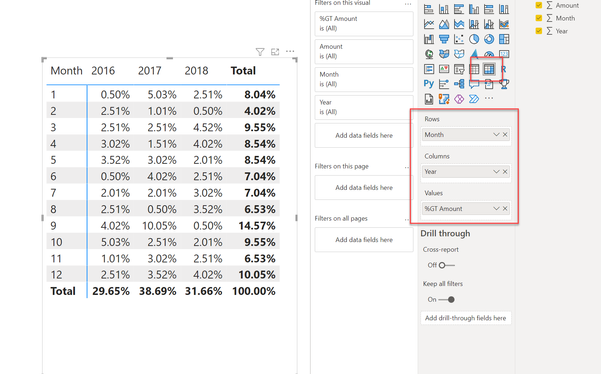
I recommend using a Matrix visual as presented below:
I hope this helps.
Theo 🙂
If I have posted a response that resolves your question, please accept it as a solution to formally close the post.
Also, if you are as passionate about Power BI, DAX and data as I am, please feel free to reach out if you have any questions, queries, or if you simply want to connect and talk to another data geek!
Want to connect?www.linkedin.com/in/theoconias
Thanks Theo, however I need more than 12 months so that solution won't work unless I am missing something.
Hi @sublog
There are only 12 months in a year. You can have as many years in the row level. If you look at the screenshot, the YEAR is at the Row level in the visual. It provides for a clear way of presenting your data in a table.
Let me know if you have any questions or need further assistance.
Thanks heaps,
Theo
If I have posted a response that resolves your question, please accept it as a solution to formally close the post.
Also, if you are as passionate about Power BI, DAX and data as I am, please feel free to reach out if you have any questions, queries, or if you simply want to connect and talk to another data geek!
Want to connect?www.linkedin.com/in/theoconias
Check out the November 2025 Power BI update to learn about new features.
Advance your Data & AI career with 50 days of live learning, contests, hands-on challenges, study groups & certifications and more!