
cancel
Showing results for 
Search instead for 
Did you mean: 

Get Fabric Certified for FREE during Fabric Data Days. Don't miss your chance! Request now

Reply
Anonymous
Not applicable

Need help connecting Date table to Fact Table

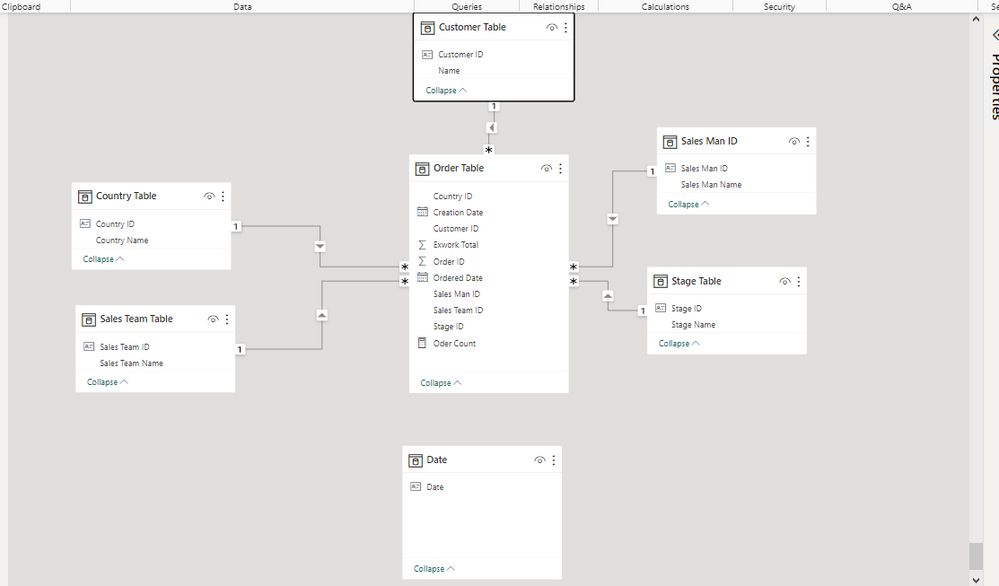
Data Model.png

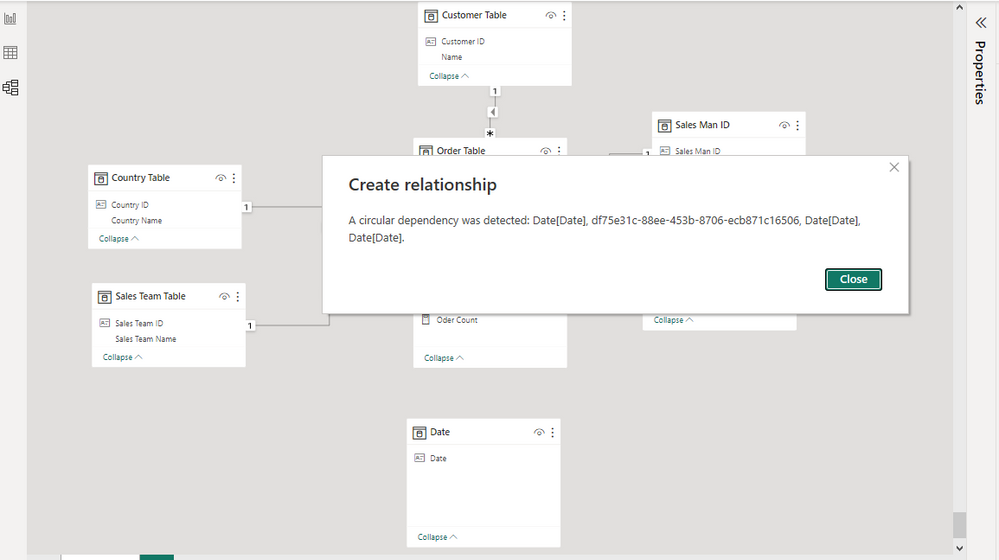
Data Model 1.png


I am a beginner learning power bi and I need help connecting my date table which was generated using calenderautofunction to my fact table which is the Order Table. Whenever i link the date with creation date with my date table i get an error but when i link the date with order date i don't get any error but it still doesn't function correctly. 

1 ACCEPTED SOLUTION
DataNinja777
Super User
Super User

Hi @Anonymous 

What about inserting a new calendar table using the "calendar" function and then linking it with the date column in the 'Order Table'?  


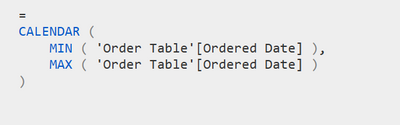
Sakiko_0-1694217205940.png

The dax formula below will generate a calendar table based on the minimum and maximum date in your fact table.

Sakiko_1-1694217297081.png

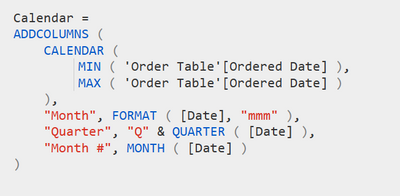
If you needed year, month, quarter, columns added, you can use "addcolumns" at the beginning like shown in an example below.

Sakiko_2-1694217639370.png


View solution in original post

2 REPLIES 2
Anonymous
Not applicable

Thank you so much! I also observed that the date format didn't match. After implementing your suggestion and creating the new table, I converted the date format to display only the date and not date/time. Additionally, I transformed the "ordered date" and "creation date"  columns in the order table to date-only format not date/time.

DataNinja777
Super User
Super User

Hi @Anonymous 

What about inserting a new calendar table using the "calendar" function and then linking it with the date column in the 'Order Table'?  


Sakiko_0-1694217205940.png

The dax formula below will generate a calendar table based on the minimum and maximum date in your fact table.

Sakiko_1-1694217297081.png

If you needed year, month, quarter, columns added, you can use "addcolumns" at the beginning like shown in an example below.

Sakiko_2-1694217639370.png


Helpful resources

Announcements
November Power BI Update Carousel

Power BI Monthly Update - November 2025

Check out the November 2025 Power BI update to learn about new features.

Fabric Data Days Carousel

Fabric Data Days

Advance your Data & AI career with 50 days of live learning, contests, hands-on challenges, study groups & certifications and more!

FabCon Atlanta 2026 carousel

FabCon Atlanta 2026

Join us at FabCon Atlanta, March 16-20, for the ultimate Fabric, Power BI, AI and SQL community-led event. Save $200 with code FABCOMM.

Top Solution Authors
Top Kudoed Authors