cancel
Showing results for 
Search instead for 
Did you mean: 

The Power BI Data Visualization World Championships is back! It's time to submit your entry. Live now!

Reply
porjaiko
Frequent Visitor

Need help about data

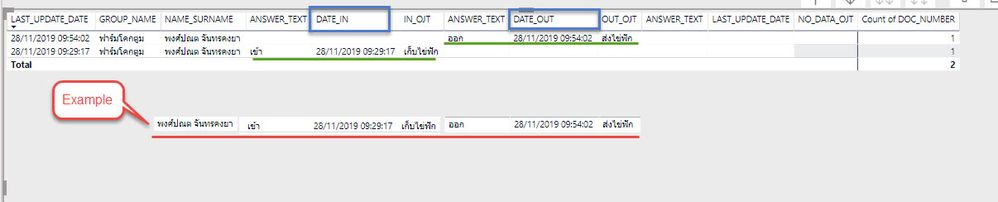
I want to data 2 column stay in the same row.


            follow in this picture in example.:

2019-12-11_10-58-22.jpg


Thank you for your help.

1 ACCEPTED SOLUTION
kentyler
Solution Sage
Solution Sage

If all the columns but the 2 you want to get into the same row have the same values, you might be able to use SUMMARIZECOLUMNS()

Returns a summary table over a set of groups.

Syntax

DAXCopy
SUMMARIZECOLUMNS( <groupBy_columnName> [, < groupBy_columnName >]…, [<filterTable>]…[, <name>, <expression>]…)  

Parameters

Term Definition
groupBy_columnNameA fully qualified column reference (Table[Column]) to a base table for which the distinct values are included in the returned table. Each groupBy_columnName column is cross-joined (different tables) or auto-existed (same table) with the subsequent specified columns.
filterTableA table expression which is added to the filter context of all columns specified as groupBy_columnName arguments. The values present in the filter table are used to filter before cross-join/auto-exist is performed.
nameA string representing the column name to use for the subsequent expression specified.
expressionAny DAX expression that returns a single value (not a table).

Return value

A table which includes combinations of values from the supplied columns, based on the grouping specified. Only rows for which at least one of the supplied expressions return a non-blank value are included in the table returned. If all expressions evaluate to BLANK/NULL for a row, that row is not included in the table returned.

Remarks

SUMMARIZECOLUMNS does not guarantee any sort order for the results.

A column cannot be specified more than once in the groupBy_columnName parameter. For example, the following formulas are invalid.

SUMMARIZECOLUMNS( Sales[StoreId], Sales[StoreId] )

Filter context

Consider the following query:

DAXCopy
SUMMARIZECOLUMNS ( 'Sales Territory'[Category], FILTER('Customer', 'Customer' [First Name] = “Alicia”) )

In this query, without a measure the groupBy columns do not contain any columns from the Filter expression (i.e. from Customer table). The filter is not applied to the groupBy columns. The Sales Territory and the Customer table may be indirectly related through the Reseller sales fact table. Since they're not directly related, the filter expression is a no-op and the groupBy columns are not impacted.

However, with this query:

DAXCopy
SUMMARIZECOLUMNS ( 'Sales Territory'[Category], 'Customer' [Education], FILTER('Customer', 'Customer'[First Name] = “Alicia”) )

The groupBy columns contain a column which is impacted by the filter and that filter is applied to the groupBy results.

Options


Did this post answer your question? Mark it as a solution so others can find it!

Help when you know. Ask when you don't!


Join the conversation at We Talk BI find out more about me at Slow BI


View solution in original post

1 REPLY 1
kentyler
Solution Sage
Solution Sage

If all the columns but the 2 you want to get into the same row have the same values, you might be able to use SUMMARIZECOLUMNS()

Returns a summary table over a set of groups.

Syntax

DAXCopy
SUMMARIZECOLUMNS( <groupBy_columnName> [, < groupBy_columnName >]…, [<filterTable>]…[, <name>, <expression>]…)  

Parameters

Term Definition
groupBy_columnNameA fully qualified column reference (Table[Column]) to a base table for which the distinct values are included in the returned table. Each groupBy_columnName column is cross-joined (different tables) or auto-existed (same table) with the subsequent specified columns.
filterTableA table expression which is added to the filter context of all columns specified as groupBy_columnName arguments. The values present in the filter table are used to filter before cross-join/auto-exist is performed.
nameA string representing the column name to use for the subsequent expression specified.
expressionAny DAX expression that returns a single value (not a table).

Return value

A table which includes combinations of values from the supplied columns, based on the grouping specified. Only rows for which at least one of the supplied expressions return a non-blank value are included in the table returned. If all expressions evaluate to BLANK/NULL for a row, that row is not included in the table returned.

Remarks

SUMMARIZECOLUMNS does not guarantee any sort order for the results.

A column cannot be specified more than once in the groupBy_columnName parameter. For example, the following formulas are invalid.

SUMMARIZECOLUMNS( Sales[StoreId], Sales[StoreId] )

Filter context

Consider the following query:

DAXCopy
SUMMARIZECOLUMNS ( 'Sales Territory'[Category], FILTER('Customer', 'Customer' [First Name] = “Alicia”) )

In this query, without a measure the groupBy columns do not contain any columns from the Filter expression (i.e. from Customer table). The filter is not applied to the groupBy columns. The Sales Territory and the Customer table may be indirectly related through the Reseller sales fact table. Since they're not directly related, the filter expression is a no-op and the groupBy columns are not impacted.

However, with this query:

DAXCopy
SUMMARIZECOLUMNS ( 'Sales Territory'[Category], 'Customer' [Education], FILTER('Customer', 'Customer'[First Name] = “Alicia”) )

The groupBy columns contain a column which is impacted by the filter and that filter is applied to the groupBy results.

Options


Did this post answer your question? Mark it as a solution so others can find it!

Help when you know. Ask when you don't!


Join the conversation at We Talk BI find out more about me at Slow BI

Helpful resources

Announcements
Power BI DataViz World Championships

Power BI Dataviz World Championships

The Power BI Data Visualization World Championships is back! It's time to submit your entry.

January Power BI Update Carousel

Power BI Monthly Update - January 2026

Check out the January 2026 Power BI update to learn about new features.

FabCon Atlanta 2026 carousel

FabCon Atlanta 2026

Join us at FabCon Atlanta, March 16-20, for the ultimate Fabric, Power BI, AI and SQL community-led event. Save $200 with code FABCOMM.