FabCon is coming to Atlanta
Join us at FabCon Atlanta from March 16 - 20, 2026, for the ultimate Fabric, Power BI, AI and SQL community-led event. Save $200 with code FABCOMM.
Register now!The Power BI Data Visualization World Championships is back! Get ahead of the game and start preparing now! Learn more
- Power BI forums
- Forums
- Get Help with Power BI
- Desktop
- Need assistance with calculation... Percentileif
- Subscribe to RSS Feed
- Mark Topic as New
- Mark Topic as Read
- Float this Topic for Current User
- Bookmark
- Subscribe
- Printer Friendly Page

- Mark as New
- Bookmark
- Subscribe
- Mute
- Subscribe to RSS Feed
- Permalink
- Report Inappropriate Content
Need assistance with calculation... Percentileif
Hello, I just started using DAX and Power BI. I am attempting to complete 2 actions here, lets say we are dealing with car loans here:
1. Each loan is assigned an expected default value or rate (i.e. Loan 1 has a DefaultRate of 5.25%). I have thousands of these. I need to figure out, for each car dealer( DealerName), what the 95th percentile is for each dealer. Users need to be able to select different time periods (PurchaseMonth) so I want the measure to be able to look at any date period used in say a slicer and adjust the 95th percentile accordingly.
95th Percentile = CALCULATE(PERCENTILE.EXC(MainData[DefaultRate],.95),MainData[DealerName]=MainData[DealerName],MainData[PurchaseMonth]=MainData[PurchaseMonth])
2. Based on that dynamic 95th percentile data point for each DealerName for each PurchaseMonth I need to take the average of the DefaultRate only where DefaultRates > 95th Percentile point. I was able to get this working only if I created a fixed column for the 95th percentile (95thPercentileRate), and then created a second column (DefaultRate5%TailLoan) used to ID the car loans that have default rates > the 95th percentile:
DefaultRate5%TailLoan = IF(MainData[DefaultRateLoan]=0,"N/A",IF(MainData[DefaultRate]>MainData[95thercentileRate],"Y","N"))
I then use the following formula to determine the average of the DefaultRates where the DefaultRate5%TailLoan column = Y
Avg.DefaultRate5%Tail = CALCULATE(AVERAGE(MainData[DefaultRate]),MainData[DefaultRate5%TailLoan]="Y")
I clearly need a lot of help and am willing to learn but I am not finding any answers in forums or training for dax useful in my situation.
Thank you
-James
Solved! Go to Solution.
- Mark as New
- Bookmark
- Subscribe
- Mute
- Subscribe to RSS Feed
- Permalink
- Report Inappropriate Content
Pro Tip:
- When referencing a column, always use the form TableName[ColumnName]
- When referencing a measure, always use the form [Measure]
This is for you own sanity -- helps you "remember" what ur talking about when going back to read your fo it "remembering" what you are talkin' about
[quote]
CALCULATE(AVERAGE(MainData[DefaultRate]), FILTER(MainData, MainData[DefaultRate]> [95thercentileRate]))
[/quote]
My guess at what is going wrong is that the call to FILTER() is going to iterate 1 row at a time over MainDate. So, you are going to evaluate [95thPercentileRate] against... 1 row. If we want to compare to the overall 95th percentile, we need to break out of the single row somehow. Maybe a new measure?
95thRate-All := CALCULATE([95thPercentileRate], ALL(MinData))
And use that in the filter?
- Mark as New
- Bookmark
- Subscribe
- Mute
- Subscribe to RSS Feed
- Permalink
- Report Inappropriate Content
Before I forget, I'm skeptical of your 95th Percentile measure. I claim that MainData[PurchaseMonth]=MainData[PurchaseMonth] is always true. I would expect Try MainData[PurchaseMonth]=EARLIER(MainData[PurchaseMonth]) or... something?
Anyway, just looking at these two parts...
IF(MainData[DefaultRate]>MainData[95thercentileRate],"Y","N")
CALCULATE(AVERAGE(MainData[DefaultRate]),MainData[DefaultRate5%TailLoan]="Y")
Seems we could combine them:
CALCULATE(AVERAGE(MainData[DefaultRate]), FILTER(MainData, MainData[DefaultRate]>MainData[95thercentileRate]))
Does that do as you hope?
- Mark as New
- Bookmark
- Subscribe
- Mute
- Subscribe to RSS Feed
- Permalink
- Report Inappropriate Content
Hi scottsen, The 95th percentile formula does "just work". Thank you
The other part that I am struggling with now is when I try the combined formula as you suggested below:
CALCULATE(AVERAGE(MainData[DefaultRate]), FILTER(MainData, MainData[DefaultRate]>MainData[95thercentileRate]))
I am receiving the following calculation error message
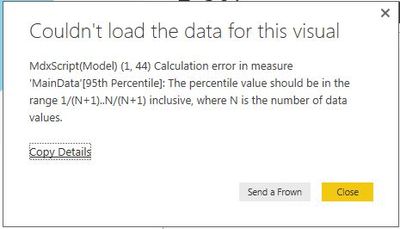
any idea what could be causing this error? Am I able to write a measure based off a separate measure?
Any and all help is appreciated. Thank you!
- Mark as New
- Bookmark
- Subscribe
- Mute
- Subscribe to RSS Feed
- Permalink
- Report Inappropriate Content
@Anonymous Any chance you would know what is causing the error message above? I am using the .95 as the k value in the percentile formula, so I am not sure why this error would come up. Also, I dont get this error in the percentile formula by itself, only when I include it in the formula which you suggested.
Thank you for your assistance!
- Mark as New
- Bookmark
- Subscribe
- Mute
- Subscribe to RSS Feed
- Permalink
- Report Inappropriate Content
Can you clarify if MainData[95thercentileRate] is a measure or a column?
- Mark as New
- Bookmark
- Subscribe
- Mute
- Subscribe to RSS Feed
- Permalink
- Report Inappropriate Content
Hi,
It is a measure. I made it as a measure since this value will adjust depending on the different selections made in slicers/filters/etc.
- Mark as New
- Bookmark
- Subscribe
- Mute
- Subscribe to RSS Feed
- Permalink
- Report Inappropriate Content
Pro Tip:
- When referencing a column, always use the form TableName[ColumnName]
- When referencing a measure, always use the form [Measure]
This is for you own sanity -- helps you "remember" what ur talking about when going back to read your fo it "remembering" what you are talkin' about
[quote]
CALCULATE(AVERAGE(MainData[DefaultRate]), FILTER(MainData, MainData[DefaultRate]> [95thercentileRate]))
[/quote]
My guess at what is going wrong is that the call to FILTER() is going to iterate 1 row at a time over MainDate. So, you are going to evaluate [95thPercentileRate] against... 1 row. If we want to compare to the overall 95th percentile, we need to break out of the single row somehow. Maybe a new measure?
95thRate-All := CALCULATE([95thPercentileRate], ALL(MinData))
And use that in the filter?
- Mark as New
- Bookmark
- Subscribe
- Mute
- Subscribe to RSS Feed
- Permalink
- Report Inappropriate Content
Boom! You rock sir. Unfortunately using the All function only gave me the results for the entire population. When I switched the function to AllSelected I obtained the correct results!
95thRate-All := CALCULATE([95thPercentileRate],ALLSELECTED(MainData))
Thank you so much!!!
- Mark as New
- Bookmark
- Subscribe
- Mute
- Subscribe to RSS Feed
- Permalink
- Report Inappropriate Content
Awesome, Thank you! That solves the second part to my question.
Now I need to figure out a way to make my 95th percentile column dynamic so that it adjusts depending on the PurchaseMonth selected by the user. So if they selected a 6 month period, the 95th percentile would be based on that period, or any other period that may be selected. Is there a way to do this? Im struggling with whether or not this should be a measure or a column.
Thank you
-James
- Mark as New
- Bookmark
- Subscribe
- Mute
- Subscribe to RSS Feed
- Permalink
- Report Inappropriate Content
If you write a measure, say just:
95th Percentile = PERCENTILE.EXC(MainData[DefaultRate],.95)
It should "just work".
It will work correctly for 1 region or all regions, 1 month or all months, etc. Measures generally work against any set/subset of rows.
Helpful resources

Power BI Dataviz World Championships
The Power BI Data Visualization World Championships is back! Get ahead of the game and start preparing now!

Power BI Monthly Update - December 2025
Check out the December 2025 Power BI Holiday Recap!

FabCon Atlanta 2026
Join us at FabCon Atlanta, March 16-20, for the ultimate Fabric, Power BI, AI and SQL community-led event. Save $200 with code FABCOMM.

| User | Count |
|---|---|
| 41 | |
| 38 | |
| 36 | |
| 30 | |
| 28 |


| User | Count |
|---|---|
| 128 | |
| 88 | |
| 79 | |
| 67 | |
| 62 |


