Don't miss your chance to take the Fabric Data Engineer (DP-600) exam for FREE! Find out how by attending the DP-600 session on April 23rd (pacific time), live or on-demand.
Learn moreNext up in the FabCon + SQLCon recap series: The roadmap for Microsoft SQL and Maximizing Developer experiences in Fabric. All sessions are available on-demand after the live show. Register now
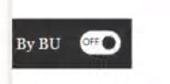
Hello all. I would like your help in something else please. I would like to create a button in which it looks like:
However, I do not know where to find this feature in Power Bi (or what it is called). Moreover, can someone please let me know how to use it to switch between 2 charts. The first chart is one chargeability of all grades (except partners), second chart includes all including partners.
Thank you for all if your help. Take care!
Solved! Go to Solution.
Please see this video by Reid Havens for how to do this.
Creating Sliding Toggles With Native Buttons in Power BI - YouTube
Pat
To learn more about Power BI, follow me on Twitter or subscribe on YouTube.
Please see this video by Reid Havens for how to do this.
Creating Sliding Toggles With Native Buttons in Power BI - YouTube
Pat
To learn more about Power BI, follow me on Twitter or subscribe on YouTube.
Thank you so much for your help!
If you have recently started exploring Fabric, we'd love to hear how it's going. Your feedback can help with product improvements.
A new Power BI DataViz World Championship is coming this June! Don't miss out on submitting your entry.
Share feedback directly with Fabric product managers, participate in targeted research studies and influence the Fabric roadmap.
| User | Count |
|---|---|
| 48 | |
| 45 | |
| 41 | |
| 20 | |
| 17 |
| User | Count |
|---|---|
| 69 | |
| 63 | |
| 32 | |
| 31 | |
| 23 |