This time we’re going bigger than ever. Fabric, Power BI, SQL, AI and more. We're covering it all. You won't want to miss it.
Learn moreDid you hear? There's a new SQL AI Developer certification (DP-800). Start preparing now and be one of the first to get certified. Register now
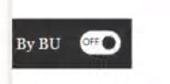
Hello all. I would like your help in something else please. I would like to create a button in which it looks like:
However, I do not know where to find this feature in Power Bi (or what it is called). Moreover, can someone please let me know how to use it to switch between 2 charts. The first chart is one chargeability of all grades (except partners), second chart includes all including partners.
Thank you for all if your help. Take care!
Solved! Go to Solution.
Please see this video by Reid Havens for how to do this.
Creating Sliding Toggles With Native Buttons in Power BI - YouTube
Pat
To learn more about Power BI, follow me on Twitter or subscribe on YouTube.
Please see this video by Reid Havens for how to do this.
Creating Sliding Toggles With Native Buttons in Power BI - YouTube
Pat
To learn more about Power BI, follow me on Twitter or subscribe on YouTube.
Thank you so much for your help!
Check out the April 2026 Power BI update to learn about new features.
Sign up to receive a private message when registration opens and key events begin.
If you have recently started exploring Fabric, we'd love to hear how it's going. Your feedback can help with product improvements.
| User | Count |
|---|---|
| 36 | |
| 33 | |
| 31 | |
| 21 | |
| 16 |
| User | Count |
|---|---|
| 66 | |
| 55 | |
| 31 | |
| 24 | |
| 23 |