Join us at FabCon Atlanta from March 16 - 20, 2026, for the ultimate Fabric, Power BI, AI and SQL community-led event. Save $200 with code FABCOMM.
Register now!The Power BI Data Visualization World Championships is back! Get ahead of the game and start preparing now! Learn more
Hi,
I have such DB for which I need to see Tbl in Power BI, where he will keep me only 1 entry per project taking into account this control:
Check for each project is Start date is the same, should check the end date and keep for me the latest date and delete other rows for that project
if the start date is not the same, he will keep for me the latest date and delete other rows related to that project.
I appreciate if you could send me the PBI report so it will be easy for me to understand.
| Project | Start Date | End date |
| A | 21/12/2021 | 18/01/2022 |
| B | 16/10/2022 | 17/10/2022 |
| C | 23/02/2022 | 22/04/2022 |
| C | 23/02/2022 | 05/06/2022 |
| C | 23/02/2022 | 25/08/2022 |
| D | 21/12/2019 | 06/07/2022 |
| K | 09/03/2020 | 02/02/2022 |
| F | 22/06/2021 | 03/07/2022 |
| Z | 15/11/2021 | 19/01/2022 |
| Z | 15/04/2022 | 20/06/2022 |
| W | 08/06/2021 | 02/02/2022 |
| J | 08/04/2020 | 18/03/2022 |
| X | 12/04/2022 | 20/04/2022 |
| X | 29/06/2022 | 29/06/2022 |
Solved! Go to Solution.
Hi,
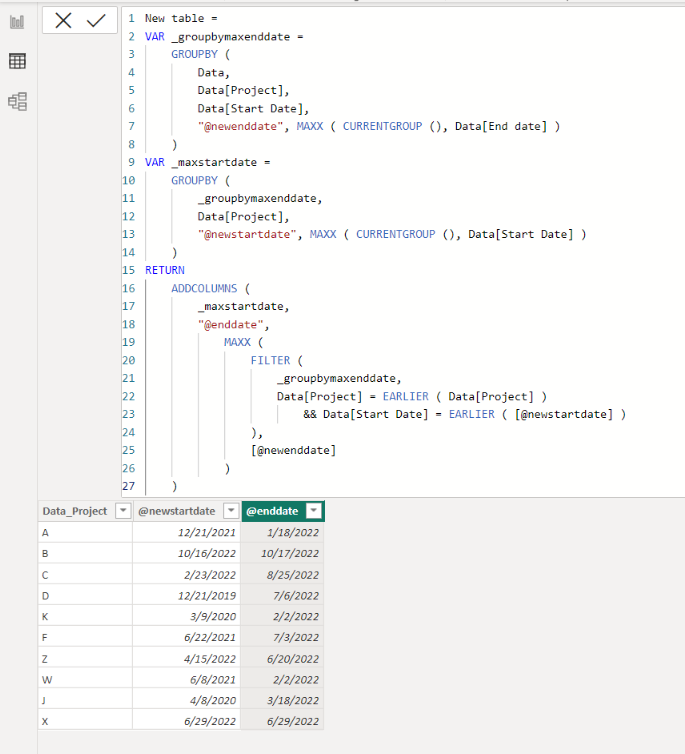
I am not sure if I understood your question correctly, but please check the below picture and the attached pbix file.
It is for creating a new table.
New table =
VAR _groupbymaxenddate =
GROUPBY (
Data,
Data[Project],
Data[Start Date],
"@newenddate", MAXX ( CURRENTGROUP (), Data[End date] )
)
VAR _maxstartdate =
GROUPBY (
_groupbymaxenddate,
Data[Project],
"@newstartdate", MAXX ( CURRENTGROUP (), Data[Start Date] )
)
RETURN
ADDCOLUMNS (
_maxstartdate,
"@enddate",
MAXX (
FILTER (
_groupbymaxenddate,
Data[Project] = EARLIER ( Data[Project] )
&& Data[Start Date] = EARLIER ( [@newstartdate] )
),
[@newenddate]
)
)
Yes that's the output i want.
Thanks
Hi,
I am not sure if I understood your question correctly, but please check the below picture and the attached pbix file.
It is for creating a new table.
New table =
VAR _groupbymaxenddate =
GROUPBY (
Data,
Data[Project],
Data[Start Date],
"@newenddate", MAXX ( CURRENTGROUP (), Data[End date] )
)
VAR _maxstartdate =
GROUPBY (
_groupbymaxenddate,
Data[Project],
"@newstartdate", MAXX ( CURRENTGROUP (), Data[Start Date] )
)
RETURN
ADDCOLUMNS (
_maxstartdate,
"@enddate",
MAXX (
FILTER (
_groupbymaxenddate,
Data[Project] = EARLIER ( Data[Project] )
&& Data[Start Date] = EARLIER ( [@newstartdate] )
),
[@newenddate]
)
)
Hi,
Clearly show the expected result.
The Power BI Data Visualization World Championships is back! Get ahead of the game and start preparing now!
Check out the November 2025 Power BI update to learn about new features.
| User | Count |
|---|---|
| 59 | |
| 43 | |
| 42 | |
| 23 | |
| 17 |
| User | Count |
|---|---|
| 190 | |
| 122 | |
| 96 | |
| 66 | |
| 47 |