Don't miss your chance to take the Fabric Data Engineer (DP-700) exam on us!
Learn moreNext up in the FabCon + SQLCon recap series: The roadmap for Microsoft SQL and Maximizing Developer experiences in Fabric. All sessions are available on-demand after the live show. Register now
Hello,
As always whenever I have some special issues in Power Bi - I came here.
Let me tell you the scenario:
I have a table in Power Bi as below -
Product Name Product Category Price Few other columns
I have created this table from a dataset as "Products". I have a filter for this table and that is "Product Part Number". There are "N" number of products and each products has a separate part number. Now there is a requirement, the products needs to be categorised. The category is based on whether those products promoted or not.
I have a dataset of partnumbers of products those are promoted and the name of the dataset is "Promotion". Now I want to create a custom column in "Products" dataset that will compare the partnumbers from the table with the partnumber column of "Promotion" table and if it matches will return "Yes" or "No".
I think "vlookup" might do it, but couldn't find a good explanation on how to implement that.
Regards
Utsav
Solved! Go to Solution.
Hi @utsavlexmark ,
Yes,"lookupvalue" function would help:
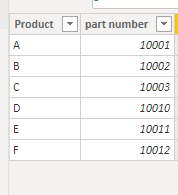
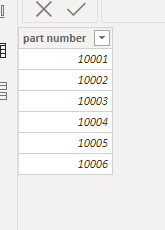
Assumed that your 2 tables as as below:
Create a calculated columns similarly as below:
Is promoted =
var _lookup=LOOKUPVALUE('Product Part Number'[Product],'Promotion'[part number],'Product Part Number'[part number],blank())
Return
IF(_lookup<>BLANK(),"Yes","No")
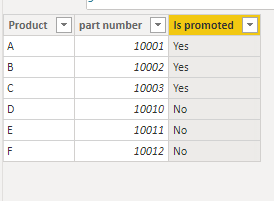
And you will see:
For the related .pbix file,pls see attached.
Best Regards,
Kelly
Did I answer your question? Mark my post as a solution!
Hi @utsavlexmark ,
Yes,"lookupvalue" function would help:
Assumed that your 2 tables as as below:
Create a calculated columns similarly as below:
Is promoted =
var _lookup=LOOKUPVALUE('Product Part Number'[Product],'Promotion'[part number],'Product Part Number'[part number],blank())
Return
IF(_lookup<>BLANK(),"Yes","No")
And you will see:
For the related .pbix file,pls see attached.
Best Regards,
Kelly
Did I answer your question? Mark my post as a solution!
@utsavlexmark , Create a new column like
Var _cnt = countx(filter(Promotion, Promotion[part number] = partnumbers[partnumbers]),Promotion[partnumbers])+0
return
if(_cnt >0, "Yes", ""No)
If you have recently started exploring Fabric, we'd love to hear how it's going. Your feedback can help with product improvements.
A new Power BI DataViz World Championship is coming this June! Don't miss out on submitting your entry.
Share feedback directly with Fabric product managers, participate in targeted research studies and influence the Fabric roadmap.
| User | Count |
|---|---|
| 48 | |
| 45 | |
| 41 | |
| 20 | |
| 18 |
| User | Count |
|---|---|
| 69 | |
| 64 | |
| 32 | |
| 31 | |
| 27 |