Don't miss your chance to take the Fabric Data Engineer (DP-600) exam for FREE! Find out how by watching the DP-600 session on-demand now through April 28th.
Learn moreJoin the FabCon + SQLCon recap series. Up next: Power BI, Real-Time Intelligence, IQ and AI, and Data Factory take center stage. All sessions are available on-demand after the live show. Register now
Is there a DAX formula to persist, or hold, the lastest value of the rolling/moving average whenever data points are over and to extend it thru time?
Solved! Go to Solution.
@Anonymous I'm sorry for that.
I'll try and see if I can get LastNonBlank to work. I propose an alternative solution.
Get the lastdate where price/box is not blank. Look up the price/box for that date.= VAR lastPriceDate = CALCULATE ( MAX ( Table1[Date] ); ALLEXCEPT ( Table1; Table1[Product] ); NOT ( ISBLANK ( Table1[Price/Box] ) ) ) VAR LastPrice = CALCULATE ( MAX ( Table1[Price/Box] ); ALL ( Table1 ); VALUES ( Table1[Product] ); Table1[Date] = lastPriceDate ) RETURN IF ( ISBLANK ( Table1[Price/Box] ); LastPrice; Table1[Price/Box] )
Cheers,
Pedro
Hi J-Saw,
Maybe something like LASTDATE() or LASTNONBLAMK(), if can't meet your requirement, please share some sample data and clarify more details about your requirement or logic.
Regards,
Jimmy Tao
@v-yuta-msft
Date Product Boxes Prices Price/Box
| 2018-01-01 | 1 | 7 | 10 | $1.43 |
| 2018-01-01 | 2 | 5 | 12 | $2.40 |
| 2018-02-01 | 1 | 9 | 10 | $1.11 |
| 2018-02-01 | 2 | 6 | 12 | $2.00 |
| 2018-03-01 | 1 | |||
| 2018-03-01 | 2 |
So basically would be having the Price/Box for 2018-03-01 using the most recent Price/Box for product 1 and 2.
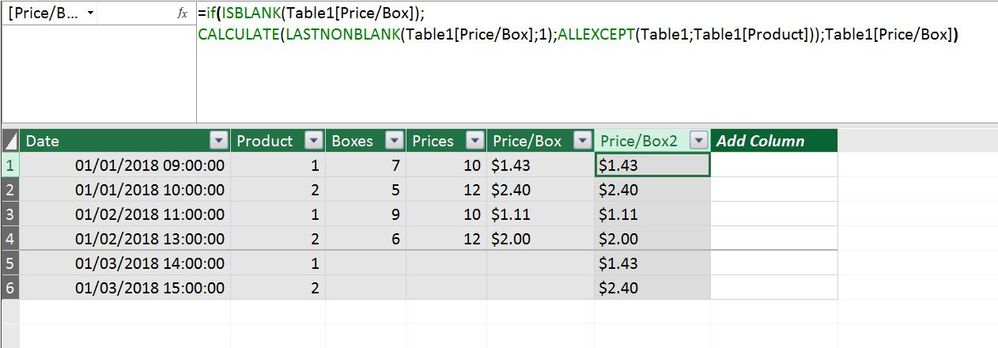
If what you're looking for is a calculated column, you can do the following:
=
IF (
ISBLANK ( Table1[Price/Box] );
CALCULATE (
LASTNONBLANK ( Table1[Price/Box]; 1 );
ALLEXCEPT ( Table1; Table1[Product] )
);
Table1[Price/Box]
)Last Price
To make the "Last Price" clear I chose to put in datetime information.
@Anonymous
Thanks. This is very helpful. However is not showing the most recent(February) Price/Box.
@Anonymous I'm sorry for that.
I'll try and see if I can get LastNonBlank to work. I propose an alternative solution.
Get the lastdate where price/box is not blank. Look up the price/box for that date.= VAR lastPriceDate = CALCULATE ( MAX ( Table1[Date] ); ALLEXCEPT ( Table1; Table1[Product] ); NOT ( ISBLANK ( Table1[Price/Box] ) ) ) VAR LastPrice = CALCULATE ( MAX ( Table1[Price/Box] ); ALL ( Table1 ); VALUES ( Table1[Product] ); Table1[Date] = lastPriceDate ) RETURN IF ( ISBLANK ( Table1[Price/Box] ); LastPrice; Table1[Price/Box] )
Cheers,
Pedro
Check out the April 2026 Power BI update to learn about new features.
If you have recently started exploring Fabric, we'd love to hear how it's going. Your feedback can help with product improvements.
A new Power BI DataViz World Championship is coming this June! Don't miss out on submitting your entry.
| User | Count |
|---|---|
| 41 | |
| 38 | |
| 32 | |
| 21 | |
| 15 |
| User | Count |
|---|---|
| 64 | |
| 59 | |
| 31 | |
| 27 | |
| 25 |