This time we’re going bigger than ever. Fabric, Power BI, SQL, AI and more. We're covering it all. You won't want to miss it.
Learn moreDid you hear? There's a new SQL AI Developer certification (DP-800). Start preparing now and be one of the first to get certified. Register now
Is there a DAX formula to persist, or hold, the lastest value of the rolling/moving average whenever data points are over and to extend it thru time?
Solved! Go to Solution.
@Anonymous I'm sorry for that.
I'll try and see if I can get LastNonBlank to work. I propose an alternative solution.
Get the lastdate where price/box is not blank. Look up the price/box for that date.= VAR lastPriceDate = CALCULATE ( MAX ( Table1[Date] ); ALLEXCEPT ( Table1; Table1[Product] ); NOT ( ISBLANK ( Table1[Price/Box] ) ) ) VAR LastPrice = CALCULATE ( MAX ( Table1[Price/Box] ); ALL ( Table1 ); VALUES ( Table1[Product] ); Table1[Date] = lastPriceDate ) RETURN IF ( ISBLANK ( Table1[Price/Box] ); LastPrice; Table1[Price/Box] )
Cheers,
Pedro
Hi J-Saw,
Maybe something like LASTDATE() or LASTNONBLAMK(), if can't meet your requirement, please share some sample data and clarify more details about your requirement or logic.
Regards,
Jimmy Tao
@v-yuta-msft
Date Product Boxes Prices Price/Box
| 2018-01-01 | 1 | 7 | 10 | $1.43 |
| 2018-01-01 | 2 | 5 | 12 | $2.40 |
| 2018-02-01 | 1 | 9 | 10 | $1.11 |
| 2018-02-01 | 2 | 6 | 12 | $2.00 |
| 2018-03-01 | 1 | |||
| 2018-03-01 | 2 |
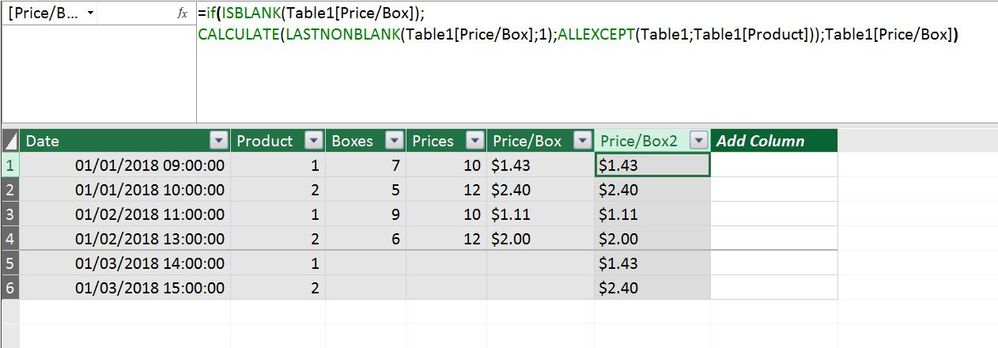
So basically would be having the Price/Box for 2018-03-01 using the most recent Price/Box for product 1 and 2.
If what you're looking for is a calculated column, you can do the following:
=
IF (
ISBLANK ( Table1[Price/Box] );
CALCULATE (
LASTNONBLANK ( Table1[Price/Box]; 1 );
ALLEXCEPT ( Table1; Table1[Product] )
);
Table1[Price/Box]
)Last Price
To make the "Last Price" clear I chose to put in datetime information.
@Anonymous
Thanks. This is very helpful. However is not showing the most recent(February) Price/Box.
@Anonymous I'm sorry for that.
I'll try and see if I can get LastNonBlank to work. I propose an alternative solution.
Get the lastdate where price/box is not blank. Look up the price/box for that date.= VAR lastPriceDate = CALCULATE ( MAX ( Table1[Date] ); ALLEXCEPT ( Table1; Table1[Product] ); NOT ( ISBLANK ( Table1[Price/Box] ) ) ) VAR LastPrice = CALCULATE ( MAX ( Table1[Price/Box] ); ALL ( Table1 ); VALUES ( Table1[Product] ); Table1[Date] = lastPriceDate ) RETURN IF ( ISBLANK ( Table1[Price/Box] ); LastPrice; Table1[Price/Box] )
Cheers,
Pedro
Check out the April 2026 Power BI update to learn about new features.
Sign up to receive a private message when registration opens and key events begin.
If you have recently started exploring Fabric, we'd love to hear how it's going. Your feedback can help with product improvements.
| User | Count |
|---|---|
| 35 | |
| 32 | |
| 25 | |
| 23 | |
| 16 |
| User | Count |
|---|---|
| 65 | |
| 50 | |
| 30 | |
| 24 | |
| 23 |