We've captured the moments from FabCon & SQLCon that everyone is talking about, and we are bringing them to the community, live and on-demand. Starts on April 14th. Register now
Hi PBI Community,
I'm having a little trouble using the more complex Business Intelligence tools.
Table T
ID | Date | Time | Value (INT)
-------- |--------------|-----------|---------
0001 | 01/01/17 | 13:30 | X
0022 | 01/01/17 | 14:30 | W
0001 | 01/01/17 | 16:30 | Z
0001 | 04/01/17 | 11:30 | X
etc.
Problem
Table X only gets updated when an T.ID has its value changed. If an T.ID does not have a value change for a given time and/or day, I need to grab the previous T.Value that T.ID had.
For Example with the data above, when graphing over a week (using bins) and drilling down to an hour (more bins and custom hireachies) on the 03/01/17, I'm a bit confused on how to contrust a measure to grab the T.Value=Z for the T.ID = 0001
I get changes every 15 minutes with 7,000 or so records, (have around 10,000 IDs) and it is against my work's protocols to duplicate data (data integrity issues), so i can just simply store when no change take last when i store it.
Currently using collated .txt files (collated to just over a million rows, then a new .txt) but will moving towards a Oracle database in the future.
Help me Obi-wan Kenobi, You're my only hope
-Ro
Solved! Go to Solution.
Hi @Anonymous,
In your scenario, there should be orders of "Date" and "Time". So let's add an index, which would help us get the value easier.
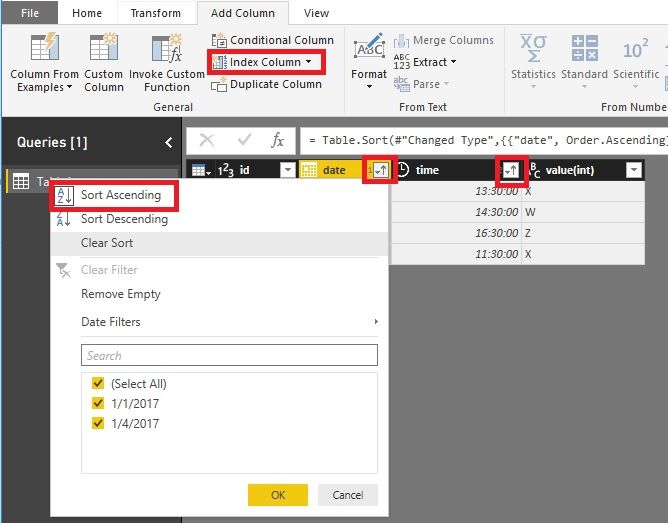
1. In Query Editor, sort "Date" then sort "Time". There will be two arrows.
2. Add an index.
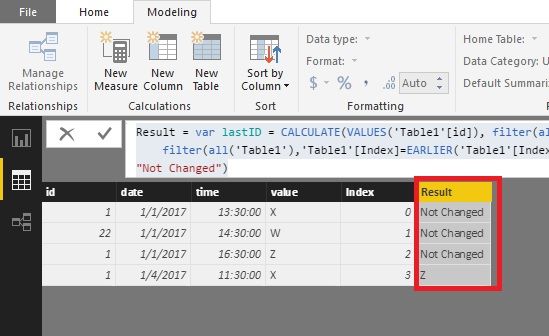
3. We would try this formula.
Result =
VAR lastID =
CALCULATE (
VALUES ( 'Table1'[id] ),
FILTER ( ALL ( 'Table1' ), 'Table1'[index] = EARLIER ( Table1[Index] ) - 1 )
)
VAR dates =
'Table1'[date]
- CALCULATE (
VALUES ( Table1[date] ),
FILTER ( ALL ( 'Table1' ), 'Table1'[Index] = EARLIER ( 'Table1'[Index] ) - 1 )
)
VAR lastValue =
CALCULATE (
VALUES ( 'Table1'[value] ),
FILTER ( ALL ( 'Table1' ), 'Table1'[Index] = EARLIER ( Table1[Index] ) - 1 )
)
RETURN
IF ( dates > 0 && 'Table1'[id] = lastID, lastvalue, "Not Changed" )
Best Regards!
Dale
Hi @Anonymous,
In your scenario, there should be orders of "Date" and "Time". So let's add an index, which would help us get the value easier.
1. In Query Editor, sort "Date" then sort "Time". There will be two arrows.
2. Add an index.
3. We would try this formula.
Result =
VAR lastID =
CALCULATE (
VALUES ( 'Table1'[id] ),
FILTER ( ALL ( 'Table1' ), 'Table1'[index] = EARLIER ( Table1[Index] ) - 1 )
)
VAR dates =
'Table1'[date]
- CALCULATE (
VALUES ( Table1[date] ),
FILTER ( ALL ( 'Table1' ), 'Table1'[Index] = EARLIER ( 'Table1'[Index] ) - 1 )
)
VAR lastValue =
CALCULATE (
VALUES ( 'Table1'[value] ),
FILTER ( ALL ( 'Table1' ), 'Table1'[Index] = EARLIER ( Table1[Index] ) - 1 )
)
RETURN
IF ( dates > 0 && 'Table1'[id] = lastID, lastvalue, "Not Changed" )
Best Regards!
Dale
If you have recently started exploring Fabric, we'd love to hear how it's going. Your feedback can help with product improvements.
A new Power BI DataViz World Championship is coming this June! Don't miss out on submitting your entry.
Share feedback directly with Fabric product managers, participate in targeted research studies and influence the Fabric roadmap.
| User | Count |
|---|---|
| 57 | |
| 38 | |
| 32 | |
| 18 | |
| 16 |
| User | Count |
|---|---|
| 66 | |
| 66 | |
| 40 | |
| 34 | |
| 25 |