cancel
Showing results for 
Search instead for 
Did you mean: 

The Power BI Data Visualization World Championships is back! Get ahead of the game and start preparing now! Learn more

Reply
Anonymous
Not applicable

Need Help - Measure

Hi PBI Community,


I'm having a little trouble using the more complex Business Intelligence tools.


Table T

ID         |   Date          |   Time     |     Value (INT)

-------- |--------------|-----------|---------
0001     |  01/01/17    |   13:30    |     X

0022     |   01/01/17   |   14:30    |     W

0001     |  01/01/17    |   16:30    |     Z

0001     |  04/01/17    |   11:30    |     X

etc.

Problem

Table X only gets updated when an T.ID has its value changed. If an T.ID does not have a value change for a given time and/or day, I need to grab the previous T.Value that T.ID had.

For Example with the data above, when graphing over a week (using bins) and drilling down to an hour (more bins and custom hireachies) on the 03/01/17, I'm a bit confused on how to contrust a measure to grab the T.Value=Z for the T.ID = 0001


I get changes every 15 minutes with 7,000 or so records, (have around 10,000 IDs) and it is against my work's protocols to duplicate data (data integrity issues), so i can just simply store when no change take last when i store it.


Currently using collated .txt files (collated to just over a million rows, then a new .txt) but will moving towards a Oracle database in the future.


Help me Obi-wan Kenobi, You're my only hope

-Ro


1 ACCEPTED SOLUTION
v-jiascu-msft
Microsoft Employee
Microsoft Employee

Hi @Anonymous,


In your scenario, there should be orders of "Date" and "Time". So let's add an index, which would help us get the value easier.

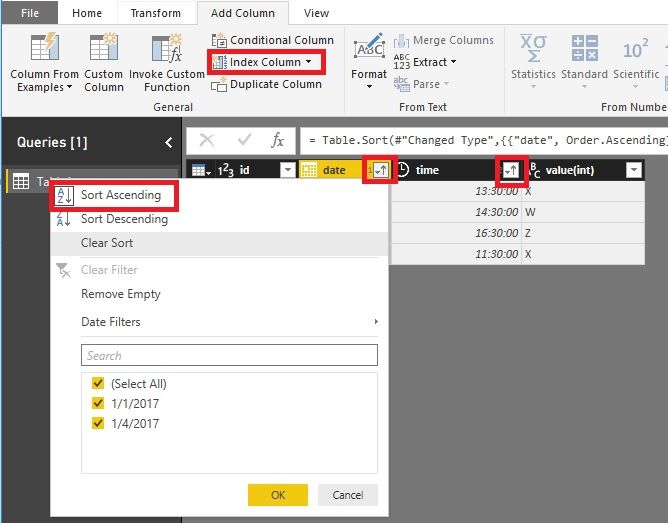
1. In Query Editor, sort "Date" then sort "Time". There will be two arrows.

2. Add an index.


Need Help - Measure .jpg


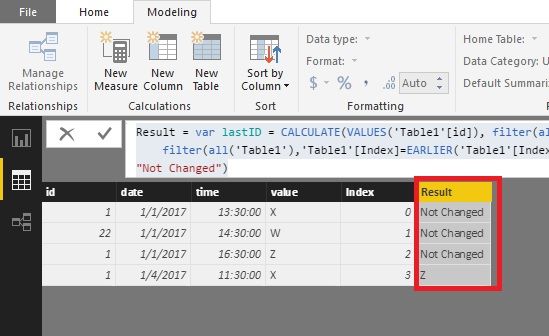
3. We would try this formula.


Result =
VAR lastID =
    CALCULATE (
        VALUES ( 'Table1'[id] ),
        FILTER ( ALL ( 'Table1' ), 'Table1'[index] = EARLIER ( Table1[Index] ) - 1 )
    )
VAR dates =
    'Table1'[date]
        - CALCULATE (
            VALUES ( Table1[date] ),
            FILTER ( ALL ( 'Table1' ), 'Table1'[Index] = EARLIER ( 'Table1'[Index] ) - 1 )
        )
VAR lastValue =
    CALCULATE (
        VALUES ( 'Table1'[value] ),
        FILTER ( ALL ( 'Table1' ), 'Table1'[Index] = EARLIER ( Table1[Index] ) - 1 )
    )
RETURN
    IF ( dates > 0 && 'Table1'[id] = lastID, lastvalue, "Not Changed" )

Need Help - Measure.jpg


Best Regards!

Dale

Community Support Team _ Dale
If this post helps, then please consider Accept it as the solution to help the other members find it more quickly.

View solution in original post

1 REPLY 1
v-jiascu-msft
Microsoft Employee
Microsoft Employee

Hi @Anonymous,


In your scenario, there should be orders of "Date" and "Time". So let's add an index, which would help us get the value easier.

1. In Query Editor, sort "Date" then sort "Time". There will be two arrows.

2. Add an index.


Need Help - Measure .jpg


3. We would try this formula.


Result =
VAR lastID =
    CALCULATE (
        VALUES ( 'Table1'[id] ),
        FILTER ( ALL ( 'Table1' ), 'Table1'[index] = EARLIER ( Table1[Index] ) - 1 )
    )
VAR dates =
    'Table1'[date]
        - CALCULATE (
            VALUES ( Table1[date] ),
            FILTER ( ALL ( 'Table1' ), 'Table1'[Index] = EARLIER ( 'Table1'[Index] ) - 1 )
        )
VAR lastValue =
    CALCULATE (
        VALUES ( 'Table1'[value] ),
        FILTER ( ALL ( 'Table1' ), 'Table1'[Index] = EARLIER ( Table1[Index] ) - 1 )
    )
RETURN
    IF ( dates > 0 && 'Table1'[id] = lastID, lastvalue, "Not Changed" )

Need Help - Measure.jpg


Best Regards!

Dale

Community Support Team _ Dale
If this post helps, then please consider Accept it as the solution to help the other members find it more quickly.

Helpful resources

Announcements
Power BI DataViz World Championships

Power BI Dataviz World Championships

The Power BI Data Visualization World Championships is back! Get ahead of the game and start preparing now!

December 2025 Power BI Update Carousel

Power BI Monthly Update - December 2025

Check out the December 2025 Power BI Holiday Recap!

FabCon Atlanta 2026 carousel

FabCon Atlanta 2026

Join us at FabCon Atlanta, March 16-20, for the ultimate Fabric, Power BI, AI and SQL community-led event. Save $200 with code FABCOMM.