This is best Fabric, Power BI, SQL and AI community event. How do we know? The last event sold out! Save €200 with code FABCMTY200.
Register nowA new Data Days event is coming soon! This time we’re going bigger than ever. Fabric, Power BI, SQL, AI and more. Don't miss out.
Hello All;
I am a new user for Power BI. I dont have any big information or ideas about this tool. So i would like to ask help on experts on this tool.
My Manager would like me to create a KPI tool using Power BI but the problem is i dont know how to do this.
As shown below, it is a sample of KPI repoting which my manager would like me to do but i dont know how to do it
Can please anyone help me on this or any points that might help me start this one.
Solved! Go to Solution.
Hi @Anonymous,
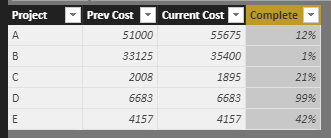
Based on my test, you could refer to below stesps:
Sample data:
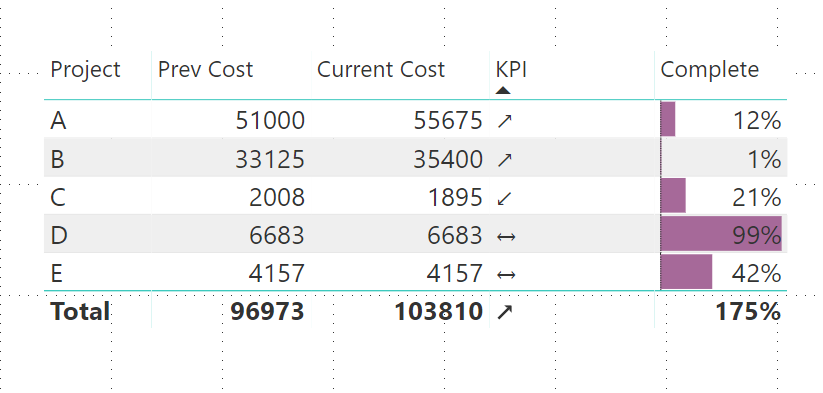
Create a measure to show the KPI:
KPI = IF(MAX('Table1'[Current Cost])<MAX('Table1'[Prev Cost]),UNICHAR(8601),IF(MAX('Table1'[Current Cost])>MAX('Table1'[Prev Cost]),UNICHAR(8599),UNICHAR(8596)))Result:
Use the conditional formatting function to modify the [Complete] column:
Result:
You could also download the pbix file to have a view.
https://www.dropbox.com/s/su9xsctgtd1tqco/KPI%20Reporting.pbix?dl=0
Regards,
Daniel He
Hi @Anonymous,
Could you please tell me if your problem has been solved? If it is, could you please mark the helpful replies as Answered?
Regards,
Daniel He
Hi @Anonymous,
Could you please tell me if your problem has been solved? If it is, could you please mark the helpful replies as Answered?
Regards,
Daniel He
Hi @Anonymous,
Based on my test, you could refer to below stesps:
Sample data:
Create a measure to show the KPI:
KPI = IF(MAX('Table1'[Current Cost])<MAX('Table1'[Prev Cost]),UNICHAR(8601),IF(MAX('Table1'[Current Cost])>MAX('Table1'[Prev Cost]),UNICHAR(8599),UNICHAR(8596)))Result:
Use the conditional formatting function to modify the [Complete] column:
Result:
You could also download the pbix file to have a view.
https://www.dropbox.com/s/su9xsctgtd1tqco/KPI%20Reporting.pbix?dl=0
Regards,
Daniel He
Check out the May 2026 Power BI update to learn about new features.
Sign up to receive a private message when registration opens and key events begin.
If you have recently started exploring Fabric, we'd love to hear how it's going. Your feedback can help with product improvements.
| User | Count |
|---|---|
| 32 | |
| 25 | |
| 23 | |
| 22 | |
| 13 |
| User | Count |
|---|---|
| 62 | |
| 47 | |
| 27 | |
| 23 | |
| 19 |