cancel
Showing results for 
Search instead for 
Did you mean: 

Get Fabric Certified for FREE during Fabric Data Days. Don't miss your chance! Request now

Reply
ERing
Post Partisan
Post Partisan

Need Help - How to sum revenue with critera

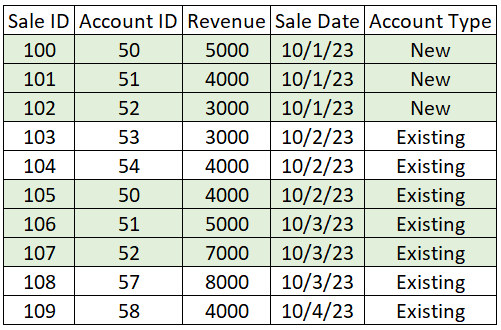
I have a requirement to have a card that displays revenue by date, however the revenue for Account Type = Existing should be summed with other records with the same Account ID according to the earliest Sale Date for records with the same Account ID.


Using the sample data below, selecting 10/1 should return $28,000 (highlighted rows). It would return the rows with sale date of 10/1/23, but also the rows where Account Type is Existing AND the Account ID matches records with the same Account ID of the selected Sale Date.


I tried doing this in PowerQuery by creating a new date column using my criteria, however I'm using Direct Query which prevented me from using that methoed.


Should I try to add a column in the report view? Can I build this logic into a measure?


Please help!


Capture 3.PNG

1 REPLY 1
amitchandak
Super User
Super User

@ERing , Try a measure like


Sumx(filter(allselected(Table), Table[Account ID] = max(Table[Account ID])) , [Revenue])


Share with Power BI Enthusiasts: Full Power BI Video (20 Hours) YouTube
Microsoft Fabric Series 60+ Videos YouTube
Microsoft Fabric Hindi End to End YouTube

Helpful resources

Announcements
November Power BI Update Carousel

Power BI Monthly Update - November 2025

Check out the November 2025 Power BI update to learn about new features.

Fabric Data Days Carousel

Fabric Data Days

Advance your Data & AI career with 50 days of live learning, contests, hands-on challenges, study groups & certifications and more!

FabCon Atlanta 2026 carousel

FabCon Atlanta 2026

Join us at FabCon Atlanta, March 16-20, for the ultimate Fabric, Power BI, AI and SQL community-led event. Save $200 with code FABCOMM.

Top Solution Authors
Top Kudoed Authors