This time we’re going bigger than ever. Fabric, Power BI, SQL, AI and more. We're covering it all. You won't want to miss it.
Learn moreDid you hear? There's a new SQL AI Developer certification (DP-800). Start preparing now and be one of the first to get certified. Register now
Hey guys, I'm at my wits end trying to figure this problem for a report coming up so I really appreciate any guidance!
I'm trying to build a relationship in order to bridge 2 tables. Table 1 contains healthcare data relating to individual patient information. It has several columns that could seemingly provide a primary key with potential candidates such as Patient ID, Payment ID, and/or Account ID. To clarify, in this first table each Patient ID will have a corresponding Payment ID and Account ID in nearby columns. Each is individually unique.
The second table is where I run into problems but I need this relationship in order to identify patterns within table 1 which produce the data in table 2. Table 2 has far fewer columns but thousands more rows because it contains the data for services provided for each patient in the first table. It contains Patient ID, Account ID, and Payment ID's from table 1. Each patient may have as many as 30 charges so obviously there are tons of duplicates values in the Patient ID, Payment ID, and Account ID columns which seems to prevent me from building this relationship.
I've attempted to concatenate a new unique index column and bridge them that way amongst other things but I can't seem to figure this out. Thanks in advance to any and all guidance with this! You'd be my hero
Solved! Go to Solution.
Hi,
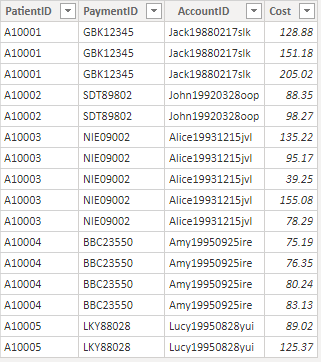
According to your description, i create two tabls to test:
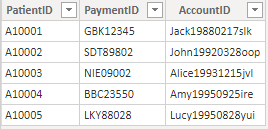
And they are many-to-many relationships, so i create a calculated table as a demension table to connect these two tables:
Table = DISTINCT(SELECTCOLUMNS(Patient,"PatientID",Patient[PatientID],"PaymentID",Patient[PaymentID],"AccountID",Patient[AccountID]))It shows:
Manage their relationships by column [PatientID] and it shows:
Hope this hepls.
Best Regards,
Giotto Zhi
Hi,
According to your description, i create two tabls to test:
And they are many-to-many relationships, so i create a calculated table as a demension table to connect these two tables:
Table = DISTINCT(SELECTCOLUMNS(Patient,"PatientID",Patient[PatientID],"PaymentID",Patient[PaymentID],"AccountID",Patient[AccountID]))It shows:
Manage their relationships by column [PatientID] and it shows:
Hope this hepls.
Best Regards,
Giotto Zhi
Check out the April 2026 Power BI update to learn about new features.
If you have recently started exploring Fabric, we'd love to hear how it's going. Your feedback can help with product improvements.
| User | Count |
|---|---|
| 36 | |
| 32 | |
| 31 | |
| 21 | |
| 15 |
| User | Count |
|---|---|
| 68 | |
| 57 | |
| 31 | |
| 29 | |
| 22 |