This time we’re going bigger than ever. Fabric, Power BI, SQL, AI and more. We're covering it all. You won't want to miss it.
Learn moreDid you hear? There's a new SQL AI Developer certification (DP-800). Start preparing now and be one of the first to get certified. Register now
Hi,
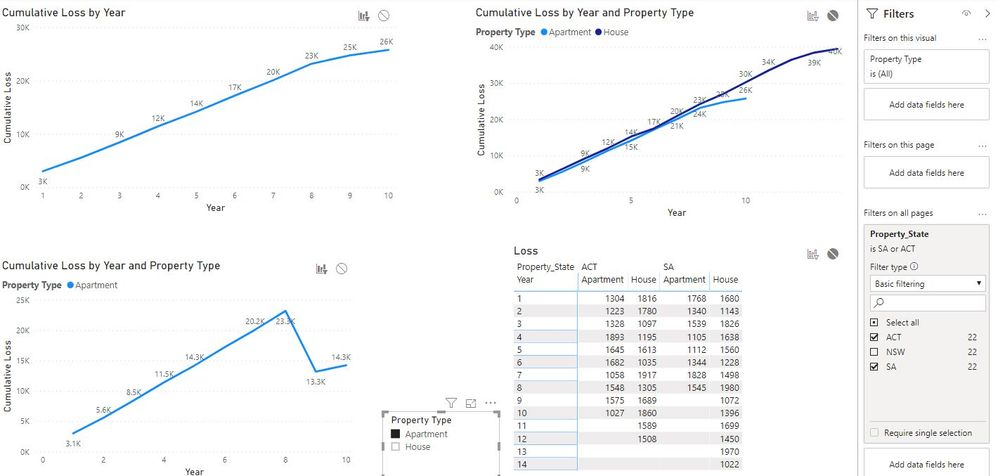
I've been expericing an unexpected behaviour with a cumulative dax measure
below the standard measure that I am using and a screenshot that illustrates my problem
Hi, @Tomasjhussey
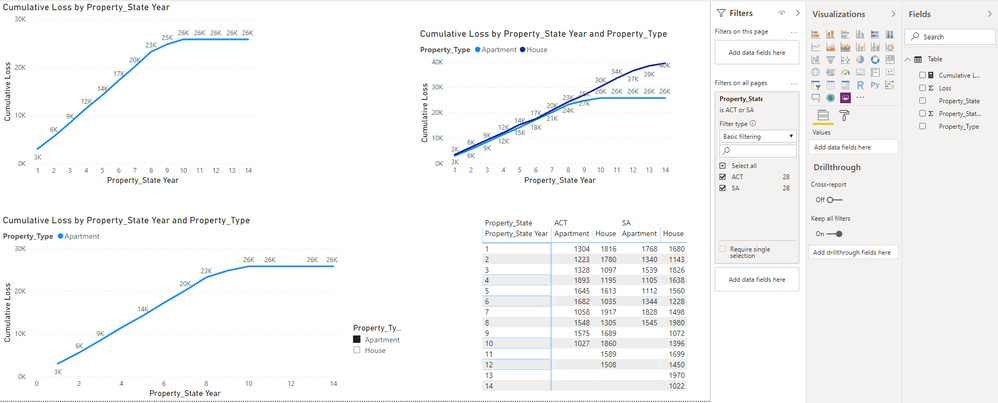
Based on your description, I created data to reproduce your scenario. However, It works correctly. I assume that maybe other tables in the data model cause the problem.
Here is my result:
You may try to create a calculated table as follows.
Year table = Distinct(Forum[Year])
Then you can use the 'Year' column in Year table to create the line chart to check whether it appears normal. Please tell me your testing result. Thanks.
Best Regards
Allan
Hi @Tomasjhussey ,
Looking at the 3rd chart, there's about 9.9K gain causing a drop. Have you checked on the visual filter? It's probably filtered by something which affects just year 9. Otherwise, could you post your data or model?
Hi @danextian
Thanks for your interest, the complete data is shown in the matrix. I can't publish the PBIX.
And yes, there is a slicer affecting that visual, in the screenshot you can see that there is a slicer is affecting 2 graphs, also a report level filter for SA and ACT . Other than that there is no visual level filter.
Thanks
Check out the April 2026 Power BI update to learn about new features.
Sign up to receive a private message when registration opens and key events begin.
If you have recently started exploring Fabric, we'd love to hear how it's going. Your feedback can help with product improvements.
| User | Count |
|---|---|
| 34 | |
| 31 | |
| 30 | |
| 21 | |
| 16 |
| User | Count |
|---|---|
| 60 | |
| 50 | |
| 29 | |
| 23 | |
| 23 |