Join us at FabCon Atlanta from March 16 - 20, 2026, for the ultimate Fabric, Power BI, AI and SQL community-led event. Save $200 with code FABCOMM.
Register now!Get Fabric Certified for FREE during Fabric Data Days. Don't miss your chance! Request now
Hi there ;
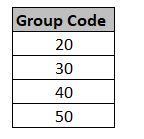
i have a column as below and i need to create a measure like that ;
If [Group Code] column is "30" give result "A"
If [Group Code] column is "50" give result "B"
ıf not give result "blank"
Solved! Go to Solution.
@erhan_79 , if [group code] measure the use as is else use max(Table[group code] )
new measure =
switch( true() ,
max(Table[group code] ) ="30" , "A" ,
max(Table[group code] ) ="50" , "B" ,
blank()
)
@erhan_79 , if [group code] measure the use as is else use max(Table[group code] )
new measure =
switch( true() ,
max(Table[group code] ) ="30" , "A" ,
max(Table[group code] ) ="50" , "B" ,
blank()
)
dear @amitchandak ;
thank you but , i have a column and want to create a measure , i think your formula for creating new column
i can not create a measure from your formula , could you pls check
thanks
Check out the November 2025 Power BI update to learn about new features.
Advance your Data & AI career with 50 days of live learning, contests, hands-on challenges, study groups & certifications and more!