Learn from the best! Meet the four finalists headed to the FINALS of the Power BI Dataviz World Championships! Register now
Hi there ;
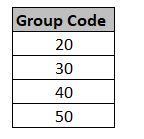
i have a column as below and i need to create a measure like that ;
If [Group Code] column is "30" give result "A"
If [Group Code] column is "50" give result "B"
ıf not give result "blank"
Solved! Go to Solution.
@erhan_79 , if [group code] measure the use as is else use max(Table[group code] )
new measure =
switch( true() ,
max(Table[group code] ) ="30" , "A" ,
max(Table[group code] ) ="50" , "B" ,
blank()
)
@erhan_79 , if [group code] measure the use as is else use max(Table[group code] )
new measure =
switch( true() ,
max(Table[group code] ) ="30" , "A" ,
max(Table[group code] ) ="50" , "B" ,
blank()
)
dear @amitchandak ;
thank you but , i have a column and want to create a measure , i think your formula for creating new column
i can not create a measure from your formula , could you pls check
thanks
If you have recently started exploring Fabric, we'd love to hear how it's going. Your feedback can help with product improvements.
A new Power BI DataViz World Championship is coming this June! Don't miss out on submitting your entry.
Share feedback directly with Fabric product managers, participate in targeted research studies and influence the Fabric roadmap.
| User | Count |
|---|---|
| 57 | |
| 38 | |
| 34 | |
| 18 | |
| 16 |
| User | Count |
|---|---|
| 68 | |
| 67 | |
| 42 | |
| 30 | |
| 26 |