Join us at FabCon Atlanta from March 16 - 20, 2026, for the ultimate Fabric, Power BI, AI and SQL community-led event. Save $200 with code FABCOMM.
Register now!The Power BI Data Visualization World Championships is back! Get ahead of the game and start preparing now! Learn more
Hi there ;
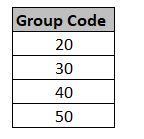
i have a column as below and i need to create a measure like that ;
If [Group Code] column is "30" give result "A"
If [Group Code] column is "50" give result "B"
ıf not give result "blank"
Solved! Go to Solution.
@erhan_79 , if [group code] measure the use as is else use max(Table[group code] )
new measure =
switch( true() ,
max(Table[group code] ) ="30" , "A" ,
max(Table[group code] ) ="50" , "B" ,
blank()
)
@erhan_79 , if [group code] measure the use as is else use max(Table[group code] )
new measure =
switch( true() ,
max(Table[group code] ) ="30" , "A" ,
max(Table[group code] ) ="50" , "B" ,
blank()
)
dear @amitchandak ;
thank you but , i have a column and want to create a measure , i think your formula for creating new column
i can not create a measure from your formula , could you pls check
thanks
The Power BI Data Visualization World Championships is back! Get ahead of the game and start preparing now!
Check out the November 2025 Power BI update to learn about new features.
| User | Count |
|---|---|
| 59 | |
| 43 | |
| 42 | |
| 23 | |
| 17 |
| User | Count |
|---|---|
| 190 | |
| 122 | |
| 96 | |
| 66 | |
| 47 |