Join us in Barcelona for FabCon and SQLCon, September 28 - October 1, 2026.
This is best Fabric, Power BI, SQL and AI community event. How do we know? The last event sold out! Save €200 with code FABCMTY200.
Register now- Power BI forums
- Get Help with Power BI
- Desktop
- Service
- Report Server
- Power Query
- Mobile Apps
- Developer
- DAX Commands and Tips
- Custom Visuals Development Discussion
- Health and Life Sciences
- Power BI Spanish forums
- Translated Spanish Desktop
- Training and Consulting
- Instructor Led Training
- Dashboard in a Day for Women, by Women
- Galleries
- Data Stories Gallery
- Themes Gallery
- Contests Gallery
- QuickViz Gallery
- Quick Measures Gallery
- Visual Calculations Gallery
- Fabric Apps Gallery
- Notebook Gallery
- Translytical Task Flow Gallery
- TMDL Gallery
- R Script Showcase
- Webinars and Video Gallery
- Ideas
- Custom Visuals Ideas (read-only)
- Issues
- Issues
- Events
- Upcoming Events
The Fabric community is upgrading! Read all of the details including the timeline and what you can expect. Learn more
- Power BI forums
- Forums
- Get Help with Power BI
- Desktop
- Re: Need Dynamic Forecast Measure
- Subscribe to RSS Feed
- Mark Topic as New
- Mark Topic as Read
- Float this Topic for Current User
- Bookmark
- Subscribe
- Printer Friendly Page

- Mark as New
- Bookmark
- Subscribe
- Mute
- Subscribe to RSS Feed
- Permalink
- Report Inappropriate Content
Need Dynamic Forecast Measure
URGENT DAX Question:
How do I modify this dax: Forecast = CALCULATE(SUM('Q3 Forecast'[Forecast]))
such that selected value if dimTime[Fiscal Quarter]=Q2, then CALCULATE(SUM('Q2 Forecast'[Forecast]),
otherwise if selected value of dimTime[Fiscal Quarter] = Q3 or Q4, then CALCULATE(SUM('Q3 Forecast'[Forecast])).
Thanks so much!
Solved! Go to Solution.


- Mark as New
- Bookmark
- Subscribe
- Mute
- Subscribe to RSS Feed
- Permalink
- Report Inappropriate Content
Hi @Anonymous ,
If it's only Q2 that has a different forecast, you might be able to try this simple solution:
SWITCH(
SELECTEDVALUE('dimTime'[Fiscal Quarter]),
"Q2", SUM('Q2 Forecast'[Forecast]),
SUM('Q3 Forecast'[Forecast])
)
It could be an IF too, but I left it at SWITCH in case you wanted to check for BLANK() and have it return BLANK() if no quarter is selected.
Respectfully,
Zoe Douglas (DataZoe)
Follow me on LinkedIn at https://www.linkedin.com/in/zoedouglas-data
See my reports and blog at https://www.datazoepowerbi.com/
- Mark as New
- Bookmark
- Subscribe
- Mute
- Subscribe to RSS Feed
- Permalink
- Report Inappropriate Content
Hi @Anonymous ,
If it's only Q2 that has a different forecast, you might be able to try this simple solution:
SWITCH(
SELECTEDVALUE('dimTime'[Fiscal Quarter]),
"Q2", SUM('Q2 Forecast'[Forecast]),
SUM('Q3 Forecast'[Forecast])
)
It could be an IF too, but I left it at SWITCH in case you wanted to check for BLANK() and have it return BLANK() if no quarter is selected.
Respectfully,
Zoe Douglas (DataZoe)
Follow me on LinkedIn at https://www.linkedin.com/in/zoedouglas-data
See my reports and blog at https://www.datazoepowerbi.com/
- Mark as New
- Bookmark
- Subscribe
- Mute
- Subscribe to RSS Feed
- Permalink
- Report Inappropriate Content


- Mark as New
- Bookmark
- Subscribe
- Mute
- Subscribe to RSS Feed
- Permalink
- Report Inappropriate Content
Hi @Anonymous
Try this
Forecast =
VAR _FiscalQurter = SELECTEDVALUE(dimTime[Fiscal Quarter])
VAR _F1 = CALCULATE(SUM('Q1 Forecast'[Forecast]))
VAR _F2 = CALCULATE(SUM('Q2 Forecast'[Forecast]))
VAR _F3_F4 = CALCULATE(SUM('Q3 Forecast'[Forecast]))
VAR Result = IF(_FiscalQurter = Q1, _F1 ,
IF(_FiscalQurter = Q2,
_F3_F4
) )
RETURN
Result
Regards
Amine Jerbi
If I answered your question, please mark this thread as accepted
and you can follow me on
My Website, LinkedIn and Facebook
- Mark as New
- Bookmark
- Subscribe
- Mute
- Subscribe to RSS Feed
- Permalink
- Report Inappropriate Content
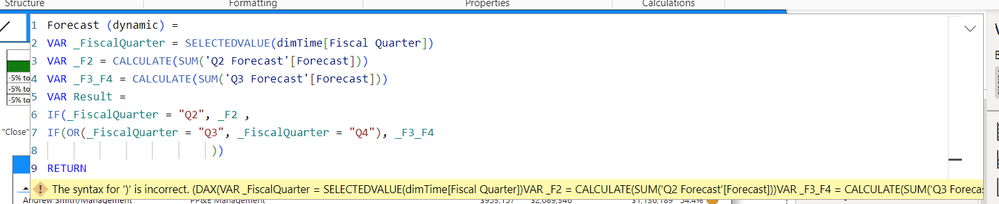
Thanks Amine. Can you pls take a look at the screenshot.
I need it so if Fiscal Quarter = Q2, then _F2, but if Fiscal Quarter = Q3 or Fiscal Quarter = Q4, then _F3_F4.
The 1st condition is clear to me (Q2).
But how can I modify the 2nd condition so that if Fiscal Quarter = Q3 or Q4, then _F3_F4.
If I want to use a SWITCH statement, how would that look like?
Thanks!

- Mark as New
- Bookmark
- Subscribe
- Mute
- Subscribe to RSS Feed
- Permalink
- Report Inappropriate Content
How about Q1, Return = Blank()? if so then
VAR Result = IF(_FiscalQurter = Q2, _F2 ,
IF(OR(_FiscalQurter = Q3, _FiscalQurter = Q4)
_F3_F4,
Blank()
) )
Regards
Amine Jerbi
If I answered your question, please mark this thread as accepted
and you can follow me on
My Website, LinkedIn and Facebook
- Mark as New
- Bookmark
- Subscribe
- Mute
- Subscribe to RSS Feed
- Permalink
- Report Inappropriate Content
Thanks again Amine. I don't need Q1 because there is not forecast for Q1 (Q1 is only budget so pulls from different table). So I modified the formula and there is new error 😞
- Mark as New
- Bookmark
- Subscribe
- Mute
- Subscribe to RSS Feed
- Permalink
- Report Inappropriate Content

check out which one!
Regards
Amine Jerbi
If I answered your question, please mark this thread as accepted
and you can follow me on
My Website, LinkedIn and Facebook
- Mark as New
- Bookmark
- Subscribe
- Mute
- Subscribe to RSS Feed
- Permalink
- Report Inappropriate Content
Do you mean delete each ")" by trial and error until the error is resolved?
Helpful resources

FabCon & SQLCon – Barcelona 2026
Join us in Barcelona for FabCon and SQLCon, the Fabric, Power BI, SQL, and AI community event. Save €200 with code FABCMTY200.

Power BI DataViz World Championships - June 2026
A new Power BI DataViz World Championship is coming this June! Don't miss out on submitting your entry.

| User | Count |
|---|---|
| 27 | |
| 22 | |
| 20 | |
| 18 | |
| 14 |


| User | Count |
|---|---|
| 25 | |
| 20 | |
| 20 | |
| 20 | |
| 20 |


