Learn from the best! Meet the four finalists headed to the FINALS of the Power BI Dataviz World Championships! Register now
Hi,
I have a growth calulated measure but the values are coming as nan and Infinity
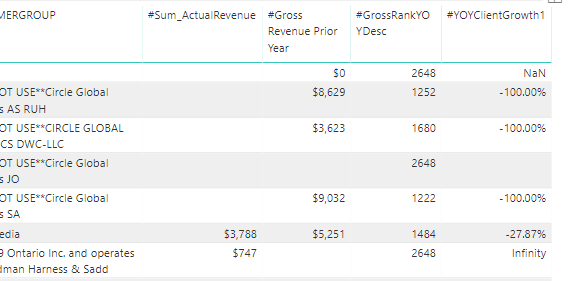
below is the sample data
The dax to calulate is
Solved! Go to Solution.
Hi @Anonymous
You are getting NAN and Infinity because you are dividing 0 by 0 and 747 by blank ( where blanks it considers as zero)..
You will have to change your formula.
or you can try creating 2 quick measures.
- 1st measure for subtraction SUM and Gross Revenue
- 2nd to divide the above measure with Gross Revenue.
Add in table to get somehting like this.
Let me know if this helps .
Thanks,
Tejaswi
use the DIVIDE function instead of "/"
This should be the solution!
Hi @Anonymous
You are getting NAN and Infinity because you are dividing 0 by 0 and 747 by blank ( where blanks it considers as zero)..
You will have to change your formula.
or you can try creating 2 quick measures.
- 1st measure for subtraction SUM and Gross Revenue
- 2nd to divide the above measure with Gross Revenue.
Add in table to get somehting like this.
Let me know if this helps .
Thanks,
Tejaswi
It worked with the Divide. Thanks
If you have recently started exploring Fabric, we'd love to hear how it's going. Your feedback can help with product improvements.
A new Power BI DataViz World Championship is coming this June! Don't miss out on submitting your entry.
Share feedback directly with Fabric product managers, participate in targeted research studies and influence the Fabric roadmap.
| User | Count |
|---|---|
| 57 | |
| 38 | |
| 34 | |
| 18 | |
| 16 |
| User | Count |
|---|---|
| 68 | |
| 67 | |
| 42 | |
| 30 | |
| 26 |