Don't miss your chance to take the Fabric Data Engineer (DP-600) exam for FREE! Find out how by watching the DP-600 session on-demand now through April 28th.
Learn moreJoin the FabCon + SQLCon recap series. Up next: Power BI, Real-Time Intelligence, IQ and AI, and Data Factory take center stage. All sessions are available on-demand after the live show. Register now
Hi,
I have the latest build of Desktop and a column chart. I added the below Measure for a Tooltip:
Revit Version =
if (DISTINCTCOUNT(vwRevitDocumentSession[RevitVersionName])<>1,
"Error",
VALUES(vwRevitDocumentSession[RevitVersionName]))
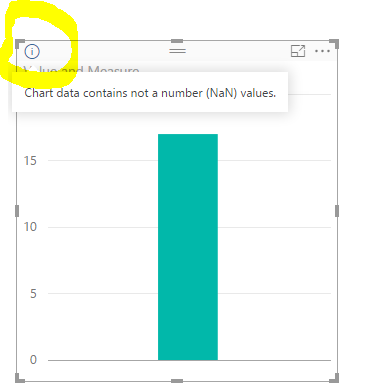
I get the "Chart data contains not a number (NaN) values"
The Tooltip seems to work correctly, if I remove this Tooltip the above warning goes away. This is a string value, I checked my data and this column all has values. With or without this Tooltip I get the same visual. I also tried filtering out blanks as a Filter.
Has anyone seen this before, is it a bug or am I doing something wrong?
Thanks,
Dan
Based on my test, that seems a warning by design. Your measure looks good. Not for a particular measure, a measure as simple as measure = "something" can lead to that warning.
Hi Eric,
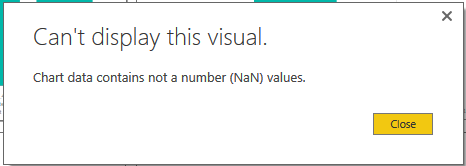
It's a simple Measure because it works to display one of many tooltips I need to show my users (I'm sure a lot of other users do the same thing). If this is really a 'works as designed' issue, then I politely ask the BI Development team to change this behavior. If the Measure is valid and the visual is not adversely affected, the message, "Can't display this visual" should not come up.
Sincerely,
Dan
@dtartaglia wrote:
Hi Eric,
It's a simple Measure because it works to display one of many tooltips I need to show my users (I'm sure a lot of other users do the same thing). If this is really a 'works as designed' issue, then I politely ask the BI Development team to change this behavior. If the Measure is valid and the visual is not adversely affected, the message, "Can't display this visual" should not come up.
Sincerely,
Dan
I thought it was just a warning as below, and it won't stop the visual from showing. Regarding "can't display this visual", can you be more specific?
Hi Eric,
This warning is not affecting my visual, the only change request I'm asking for is that the warning should not be shown since my Measure is correct. If you click the 'i' you see the below message. If a novice user (or any user who didn't know this issue) used this tool, created tooltips and saw the warning, they may think their visual may not display correctly, this is my only issue. A warning should not come up for no reason.
Thanks,
Dan
Check out the April 2026 Power BI update to learn about new features.
If you have recently started exploring Fabric, we'd love to hear how it's going. Your feedback can help with product improvements.
A new Power BI DataViz World Championship is coming this June! Don't miss out on submitting your entry.
| User | Count |
|---|---|
| 45 | |
| 38 | |
| 34 | |
| 21 | |
| 17 |
| User | Count |
|---|---|
| 66 | |
| 64 | |
| 31 | |
| 26 | |
| 26 |