cancel
Showing results for 
Search instead for 
Did you mean: 

The Power BI Data Visualization World Championships is back! Get ahead of the game and start preparing now! Learn more

Reply
admin11
Memorable Member
Memorable Member

My PBI unable refresh , what else I should try ?

Hi All ,


I have develop a PBI file for 2 year ago . Now when I try to refresh . I will get error. I already spend more then 3 day I still unable figure out where go wrong ? Can some one suggest to me What else I should do , beside I start to create a new PBI file from zero ?


Paul

2 ACCEPTED SOLUTIONS
mahoneypat
Microsoft Employee
Microsoft Employee

Go into the query editor and click the Applied Steps one at a time in each query (if more than one), and share the error you see if the first step that returns an error.


Pat


Did I answer your question? Mark my post as a solution! Kudos are also appreciated!

To learn more about Power BI, follow me on Twitter or subscribe on YouTube.


@mahoneypa HoosierBI on YouTube


View solution in original post

@mahoneypat 

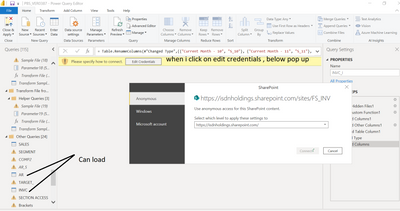
Many thank for your reply to my post . You are great. after i load the PBI file , i go to PQ editor , after few minute , i notice that some of the table load some are not loading. So what i did is i delete those table which unable to load , and clear all the error , i am am able to refresh. so meaning i have hope now. i don't have to start to zero , and can take those back up file whch is last week , and i just need to do the above step , it will save me a lot a lot of my time to add table.

Appreciate very much. To night i can finally have a good sleep. 

I owe you a lot.

Paul

admin11_0-1646575431918.png


View solution in original post

2 REPLIES 2
mahoneypat
Microsoft Employee
Microsoft Employee

Go into the query editor and click the Applied Steps one at a time in each query (if more than one), and share the error you see if the first step that returns an error.


Pat


Did I answer your question? Mark my post as a solution! Kudos are also appreciated!

To learn more about Power BI, follow me on Twitter or subscribe on YouTube.


@mahoneypa HoosierBI on YouTube


@mahoneypat 

Many thank for your reply to my post . You are great. after i load the PBI file , i go to PQ editor , after few minute , i notice that some of the table load some are not loading. So what i did is i delete those table which unable to load , and clear all the error , i am am able to refresh. so meaning i have hope now. i don't have to start to zero , and can take those back up file whch is last week , and i just need to do the above step , it will save me a lot a lot of my time to add table.

Appreciate very much. To night i can finally have a good sleep. 

I owe you a lot.

Paul

admin11_0-1646575431918.png


Helpful resources

Announcements
Power BI DataViz World Championships

Power BI Dataviz World Championships

The Power BI Data Visualization World Championships is back! Get ahead of the game and start preparing now!

November Power BI Update Carousel

Power BI Monthly Update - November 2025

Check out the November 2025 Power BI update to learn about new features.

FabCon Atlanta 2026 carousel

FabCon Atlanta 2026

Join us at FabCon Atlanta, March 16-20, for the ultimate Fabric, Power BI, AI and SQL community-led event. Save $200 with code FABCOMM.