cancel
Showing results for 
Search instead for 
Did you mean: 

Learn from the best! Meet the four finalists headed to the FINALS of the Power BI Dataviz World Championships! Register now

Reply
Anonymous
Not applicable

Multiplying Columns In Different Tables With Relationships - Calculated Column of Measure

Community,

Having not much experience with DAX I am having trouble with the following;

Below are my sample tables, their relationships and the values 

TableOpts2.JPG


I would like to be able to multiply the "Raw Data" in the data table by the "Weightings" in the weightings table.

Should this be a measure or calculated column?

Do I need to create an additional table in modeling to do this?


Any help would be much appreciated!!

1 ACCEPTED SOLUTION
Anonymous
Not applicable

Hi @Anonymous ,


I dont think you need any additional table.


There is already a relationships between these two tables.


You can use either a quick measure , measure or  calculated column for this :


1. Quick Measure 

Capture 30.PNG

2. DAX measure 

Measure = Sumx('Data Table','Data Table'[Raw Data]*related(weightings[weightings]))

3. calculated column

Column = 'Data Table'[Raw Data]*RELATED(weightings[weightings])

the answers is going to be the same.

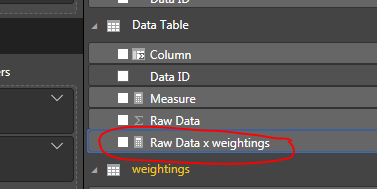
Look at my output.


Capture 31.PNG

let me know for any question.


Thanks,

Tejaswi


View solution in original post

2 REPLIES 2
Anonymous
Not applicable

Hi @Anonymous ,


I dont think you need any additional table.


There is already a relationships between these two tables.


You can use either a quick measure , measure or  calculated column for this :


1. Quick Measure 

Capture 30.PNG

2. DAX measure 

Measure = Sumx('Data Table','Data Table'[Raw Data]*related(weightings[weightings]))

3. calculated column

Column = 'Data Table'[Raw Data]*RELATED(weightings[weightings])

the answers is going to be the same.

Look at my output.


Capture 31.PNG

let me know for any question.


Thanks,

Tejaswi


Anonymous
Not applicable

@Anonymous 


This works as I need thanks!

Helpful resources

Announcements
Join our Fabric User Panel

Join our Fabric User Panel

Share feedback directly with Fabric product managers, participate in targeted research studies and influence the Fabric roadmap.

February Power BI Update Carousel

Power BI Monthly Update - February 2026

Check out the February 2026 Power BI update to learn about new features.

FabCon Atlanta 2026 carousel

FabCon Atlanta 2026

Join us at FabCon Atlanta, March 16-20, for the ultimate Fabric, Power BI, AI and SQL community-led event. Save $200 with code FABCOMM.