cancel
Showing results for 
Search instead for 
Did you mean: 

Get Fabric Certified for FREE during Fabric Data Days. Don't miss your chance! Request now

Reply
Anonymous
Not applicable

Get the latest status per Entry but different dates

Hello PBI Community!


I am currently working on a data where an application has a milestone, status, and date, wherein each application have its own dates and milestone progress.


Example data:

Application NumberMilestoneStatusStatus Date Tagged
App1New ApplicationNew Application1-Jan-19 8:40
App1Under ReviewUnder Review1-Jan-19 8:45
App1Under ReviewFindings1-Jan-19 9:15
App2New ApplicationNew Application1-Jan-19 10:00
App2Under ReviewUnder Review2-Jan-19 7:54
App2Passed ReviewFor booking3-Jan-19 16:00
App2BookedBooked3-Jan-19 18:23
App3New ApplicationNew Application3-Jan-19 8:12
App4New ApplicationNew Application4-Jan-19 9:15
App4Under ReviewUnder Review4-Jan-19 13:11


And I want the data in Power BI to be like this:

New Application1
Under Review2
   -Findings1
   -Under Review1
Booked1


What functions should I use to read the latest entry regardless of Application Number? Because currently I'm having this one:

New Application4
Under Review4
   -Findings1
   -Under Review3
Passed Review1
   -For booking1
Booked1


which captures all entry.


Thank you in advance for your help!

1 ACCEPTED SOLUTION
Anonymous
Not applicable

Hi @Anonymous ,

You can add a additional conditions to exclude passed milestone status:

measure =
CALCULATE (
    COUNTROWS ( VALUES ( Table[Status] ) ),
    VALUES ( Table[Milestone] ),
    Table[Milestone] <> "Passed Review"
)

Regards,

Xiaoxin Sheng

View solution in original post

3 REPLIES 3
Anonymous
Not applicable

Hi @Anonymous ,

You can create a matrix visual and use milestone, status as row, write a measure as value, then drill row fields to bottom level and it should display the result you wanted.

measure =
CALCULATE (
    COUNTROWS ( VALUES ( Table[Status] ) ),
    VALUES ( Table[Milestone] )
)

Regards,

Xiaoxin Sheng

Anonymous
Not applicable

Hi @Anonymous,


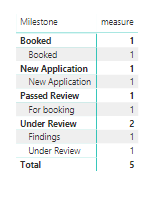
I got all the numbers but I got an extra row and count which I shouldn't get (Passed Review - For booking).


Untitled.png

Anonymous
Not applicable

Hi @Anonymous ,

You can add a additional conditions to exclude passed milestone status:

measure =
CALCULATE (
    COUNTROWS ( VALUES ( Table[Status] ) ),
    VALUES ( Table[Milestone] ),
    Table[Milestone] <> "Passed Review"
)

Regards,

Xiaoxin Sheng

Helpful resources

Announcements
November Power BI Update Carousel

Power BI Monthly Update - November 2025

Check out the November 2025 Power BI update to learn about new features.

Fabric Data Days Carousel

Fabric Data Days

Advance your Data & AI career with 50 days of live learning, contests, hands-on challenges, study groups & certifications and more!

FabCon Atlanta 2026 carousel

FabCon Atlanta 2026

Join us at FabCon Atlanta, March 16-20, for the ultimate Fabric, Power BI, AI and SQL community-led event. Save $200 with code FABCOMM.

Top Solution Authors
Top Kudoed Authors