cancel
Showing results for 
Search instead for 
Did you mean: 

July 7 - July 17 | Round 2 of the Power BI Dataviz World Championships. Don't miss your chance! Learn more

Reply
Anonymous
Not applicable

Multiple manual value inputs

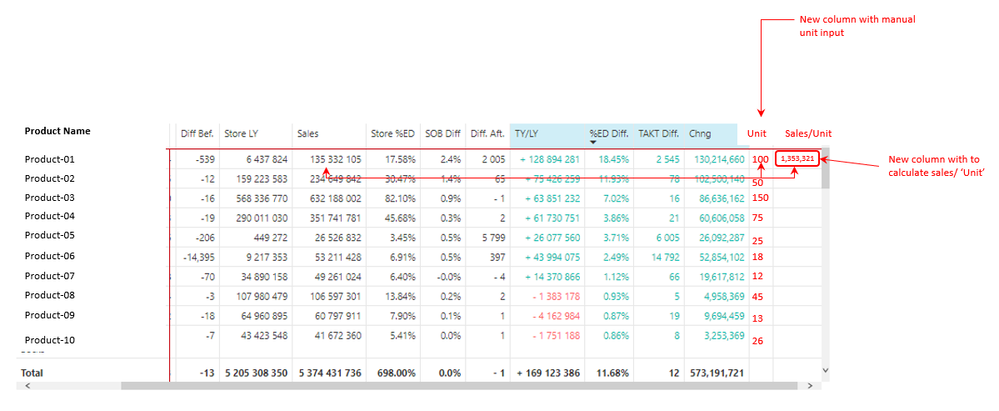
I am trying to input multiple unique values manually into a column where I can then divide this value into sales. I tried 'New parameters' but this only creates one value through a slicer. Any suggestions on how to input multiple unique values manually (please also see the screenshot below for a much clearer representation of this) would be GREATLY appreciated. 🙂 

PS. I am using a live connection to a SQL database.


Kind regards,


Kevin

Power BI forum-Manual Input.PNG

1 ACCEPTED SOLUTION
TomMartens
Super User
Super User

Hey @Anonymous ,


unfortunately, the answer to your question is simple. It's not possible!


Basically, Power BI does not support input. There are some approaches you might try though.
First approach, you consider using a Power App that allows you to add values to a SQL Server table. Please be aware that using a Power App requires additional licensing, even more as SQL Server storage requires Power Apps Premium licensing.

My approach would be using the Inforiver Enterprise visual as this visual supports writeback that blends perfectly into a table, also this approach requires additional licensing.


Hopefully, this provides you with some ideas of how to tackle your challenge.


Regards,

Tom


Did I answer your question? Mark my post as a solution, this will help others!

Proud to be a Super User!
I accept Kudos 😉
Hamburg, Germany

View solution in original post

2 REPLIES 2
TomMartens
Super User
Super User

Hey @Anonymous ,


unfortunately, the answer to your question is simple. It's not possible!


Basically, Power BI does not support input. There are some approaches you might try though.
First approach, you consider using a Power App that allows you to add values to a SQL Server table. Please be aware that using a Power App requires additional licensing, even more as SQL Server storage requires Power Apps Premium licensing.

My approach would be using the Inforiver Enterprise visual as this visual supports writeback that blends perfectly into a table, also this approach requires additional licensing.


Hopefully, this provides you with some ideas of how to tackle your challenge.


Regards,

Tom


Did I answer your question? Mark my post as a solution, this will help others!

Proud to be a Super User!
I accept Kudos 😉
Hamburg, Germany
Anonymous
Not applicable

Thanks so much for taking the time to reply, Tom. This kind of manual input functionality would be tremendously helpful for analyzing unit based business decisions relative to sales datasets. I'll look into that app you recommended!


KR,


Kevin

Helpful resources

Announcements
FabCon and SQLCon Barcelona 2026

FabCon & SQLCon – Barcelona 2026

Join us in Barcelona for FabCon and SQLCon, the Fabric, Power BI, SQL, and AI community event. Save €200 with code FABCMTY200.

60 days of Data Days Carousel

Data Days 2026

Join Fabric Data Days 2026: 60 days of free live/on-demand sessions, challenges, study groups, and certification opportunities.

Power BI DataViz World Championships carousel

Power BI DataViz World Championships - June 2026

A new Power BI DataViz World Championship is coming this June! Don't miss out on submitting your entry.

Top Solution Authors