Get Fabric or SQL Certified for Free.
Get certified for free when you join Fabric Data Days 2026 and dive into Fabric, Power BI, SQL, AI, and other essential data skills.
Join now- Power BI forums
- Get Help with Power BI
- Desktop
- Service
- Report Server
- Power Query
- Mobile Apps
- Developer
- DAX Commands and Tips
- Custom Visuals Development Discussion
- Health and Life Sciences
- Power BI Spanish forums
- Translated Spanish Desktop
- Training and Consulting
- Instructor Led Training
- Dashboard in a Day for Women, by Women
- Galleries
- Data Stories Gallery
- Themes Gallery
- Contests Gallery
- QuickViz Gallery
- Quick Measures Gallery
- Visual Calculations Gallery
- Fabric Apps Gallery
- Notebook Gallery
- Translytical Task Flow Gallery
- TMDL Gallery
- R Script Showcase
- Webinars and Video Gallery
- Ideas
- Custom Visuals Ideas (read-only)
- Issues
- Issues
- Events
- Upcoming Events
July 28 - August 9 | Final Round of the Power BI Dataviz World Championships. This is your chance. Learn more
- Power BI forums
- Forums
- Get Help with Power BI
- Desktop
- Re: Multiple filter
- Subscribe to RSS Feed
- Mark Topic as New
- Mark Topic as Read
- Float this Topic for Current User
- Bookmark
- Subscribe
- Printer Friendly Page


- Mark as New
- Bookmark
- Subscribe
- Mute
- Subscribe to RSS Feed
- Permalink
- Report Inappropriate Content
Multiple filter
Hi,
I have a situation like on the picture (WHAT I HAVE)

So multiple values in each column. I need to find last address which was entered (last entry no.)
When I type formula
| Adrese = CALCULATETABLE(Table1;FILTER(Table1;Table1[Type] = "Address" && max(Table1[Entry_No]))) |
I got the red table which is not correct, and what I need is in the green table.
I tried with calculated table, but the measure will be also fine, just to get last value based on type address and last entry no.
Thanks,
Renato.
Solved! Go to Solution.


- Mark as New
- Bookmark
- Subscribe
- Mute
- Subscribe to RSS Feed
- Permalink
- Report Inappropriate Content
Hi @renatof,
If you only to get the max Entry_No when the type is Address, please try this formula again.
Table 3 =
TOPN (
    1,
    SUMMARIZE (
        'Table1',
        Table1[Person_No],
        Table1[Value],
        'Table1'[Type],
        "max", CALCULATE (
            MAX ( 'Table1'[Entry_No] ),
            FILTER ( 'Table1', 'Table1'[Type] = "Address" )
        )
    ),
    [max], DESC
)

Best Regards,
Cherry
If this post helps, then please consider Accept it as the solution to help the other members find it more quickly.
- Mark as New
- Bookmark
- Subscribe
- Mute
- Subscribe to RSS Feed
- Permalink
- Report Inappropriate Content
Hi @renatof,
By my test, you could have a try with this formula below.
Table 2 =
TOPN (
    CALCULATE (
        COUNT ( 'Table1'[Person_No] ),
        FILTER ( 'Table1', 'Table1'[Entry_No] = MAX ( 'Table1'[Entry_No] ) )
    ),
    'Table1',
    'Table1'[Entry_No], DESC
)
Then you will get the output.
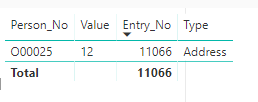
Hope this can help you!
Best Regards,
Cherry
If this post helps, then please consider Accept it as the solution to help the other members find it more quickly.
- Mark as New
- Bookmark
- Subscribe
- Mute
- Subscribe to RSS Feed
- Permalink
- Report Inappropriate Content
Hi,
this could work but column type I have multiple types so one more filter which is related to Table1[Type] = "Address" + last entry no.
- Mark as New
- Bookmark
- Subscribe
- Mute
- Subscribe to RSS Feed
- Permalink
- Report Inappropriate Content
Hi @renatof,
If you only to get the max Entry_No when the type is Address, please try this formula again.
Table 3 =
TOPN (
    1,
    SUMMARIZE (
        'Table1',
        Table1[Person_No],
        Table1[Value],
        'Table1'[Type],
        "max", CALCULATE (
            MAX ( 'Table1'[Entry_No] ),
            FILTER ( 'Table1', 'Table1'[Type] = "Address" )
        )
    ),
    [max], DESC
)
Best Regards,
Cherry
If this post helps, then please consider Accept it as the solution to help the other members find it more quickly.
- Mark as New
- Bookmark
- Subscribe
- Mute
- Subscribe to RSS Feed
- Permalink
- Report Inappropriate Content
Thank you. This is solution 🙂


- Mark as New
- Bookmark
- Subscribe
- Mute
- Subscribe to RSS Feed
- Permalink
- Report Inappropriate Content
Why don't you use the visual level filter? Select show only TOP N category and sort it on [Entory_No]

- Mark as New
- Bookmark
- Subscribe
- Mute
- Subscribe to RSS Feed
- Permalink
- Report Inappropriate Content
Have you tried
| Adrese = CALCULATETABLE(Table1;FILTER(Table1;Table1[Type] = "Address" ), Table1.Entry_No = max(Table1[Entry_No])) |
Basically i split the two fliters. Without test data i cant simulate to be certain.
- Mark as New
- Bookmark
- Subscribe
- Mute
- Subscribe to RSS Feed
- Permalink
- Report Inappropriate Content
Yes I tried with Adrese = CALCULATETABLE(Table1;FILTER(Table1;Table1[Type] = "Address");Table1[Entry_No] = MAX(Table1[Entry_No]))
and I got error A Function 'MAX' has been used in a True/False expression that is used as a table filter expression. This is not allowed.

Helpful resources

Fabric Community Sticker Challenge - Barcelona 2026
If you love stickers, then you will definitely want to check out our community sticker challenge, Barcelona edition!

Power BI Monthly Update - July 2026
Check out the July 2026 Power BI update to learn about new features.

Power BI DataViz World Championships - June 2026
A new Power BI DataViz World Championship is coming this June! Don't miss out on submitting your entry.

| User | Count |
|---|---|
| 28 | |
| 28 | |
| 20 | |
| 19 | |
| 19 |


| User | Count |
|---|---|
| 43 | |
| 31 | |
| 18 | |
| 18 | |
| 16 |


