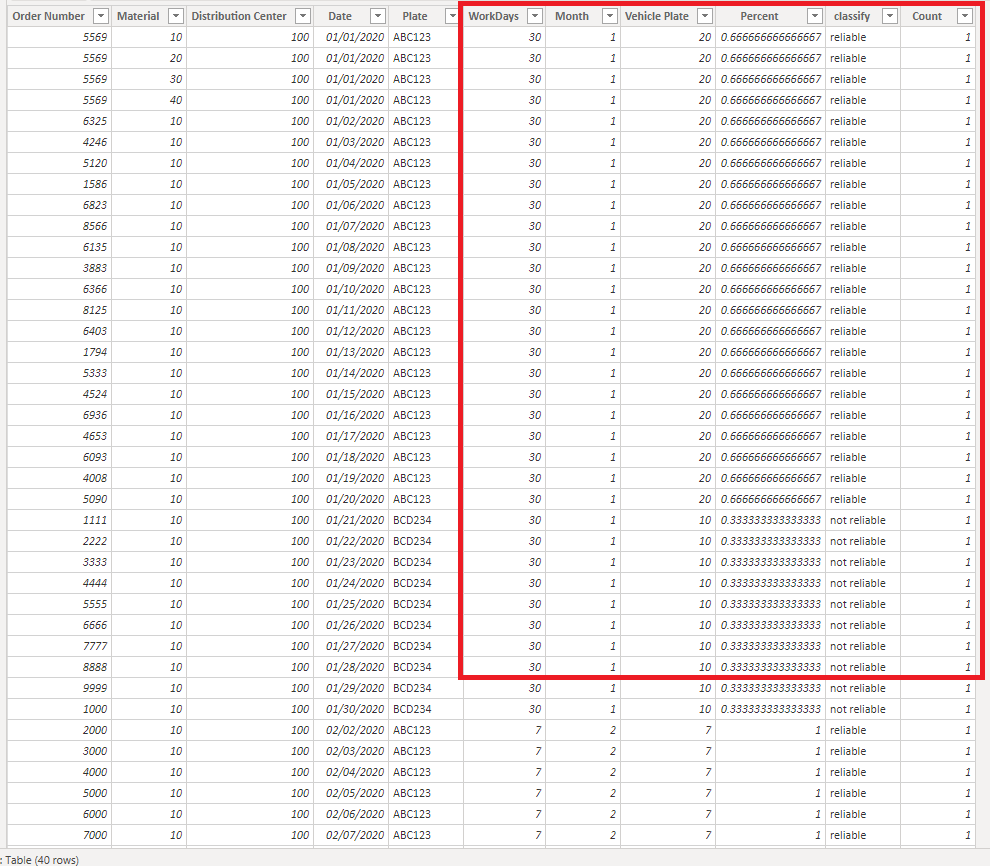
Hi guys, I need to do an analysis and I'm struggling with it. Basically I have three important things on my database: the date, the distribution center code and the vehicle's plate. I need to calculate the percentage of days that a specific vehicle shows up on the distribution center and classify them according to it (over 60% the vehicle is considered reliable and below that is not). I'm struggling with the fact that a vehicle can show up to multiple centers and on different months and the distribution centers have a different total of operating days.
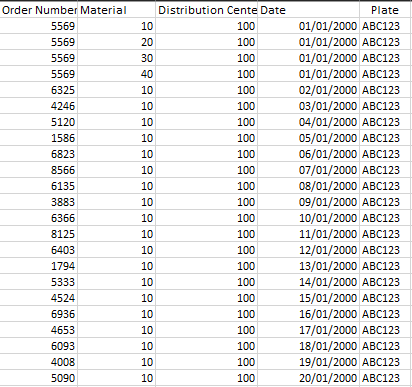
I'm really sorry. I could not figure out how to put my excel sampla here. So I had to take a printscreen of it. Basically what I have in my data base is the following:
What I need to do: a distinctcount of dates from a month for each distribution center (to see how many days they opened in January, for example) and a distinctcount of dates that a specific vehicle showed up to that specific distribution center in each month. So I would like to have a column that repeated the number of days that the center opened in that month (in January, the distribution center 100 worked 30 days, so all lines from it and January would have 30) and a column that repeated the number of days that the vehicle showed up to that center (the ABC123 showed up 20 days of january). If I could do that, would be a matter of dividing 20/30 for every row with both conditions and it would return 0,66 (or 66%). What I need to do is classify that percentage with an if (if x% >= 0,6; "reliable"; "not reliable") in order to count how many plates are reliable and how many are not for each month.
I hope that helps. Please, do you have any idea on how to do it? Thank you in advance!