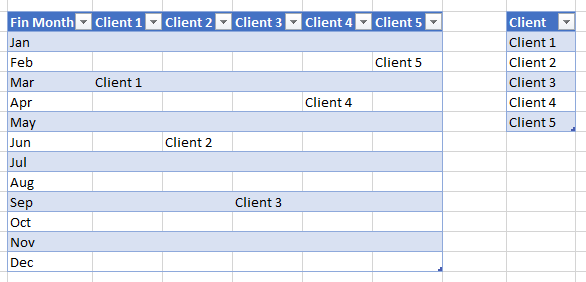
Hi @Anonymous ,
Please check the following steps as below.
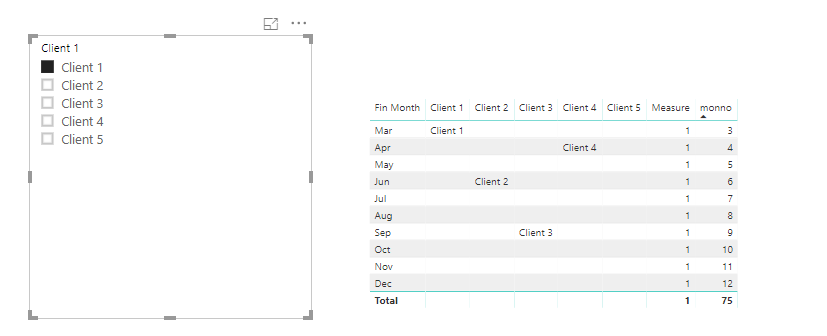
1. Create a calculated column as below.
monno =
SWITCH (
    Table1[Fin Month],
    "Jan", 1,
    "Feb", 2,
    "Mar", 3,
    "Apr", 4,
    "May", 5,
    "Jun", 6,
    "Jul", 7,
    "Aug", 8,
    "Sep", 9,
    "Oct", 10,
    "Nov", 11,
    "Dec", 12
)
2. Create a measure to get the excepted result.
Measure =
VAR sel =
    SELECTEDVALUE ( 'Table'[Client 1] )
VAR a =
    CALCULATE (
        MAX ( Table1[monno] ),
        FILTER (
            ALL ( Table1 ),
            Table1[Client 1] = sel
                || Table1[Client 2] = sel
                || Table1[Client 3] = sel
                || Table1[Client 4] = sel
                || Table1[Client 5] = sel
        )
    )
RETURN
    IF ( MAX ( Table1[monno] ) >= a, 1, 0 )
Community Support Team _ Frank
If this post helps, then please consider Accept it as the solution to help the others find it more quickly.