Join us at FabCon Atlanta from March 16 - 20, 2026, for the ultimate Fabric, Power BI, AI and SQL community-led event. Save $200 with code FABCOMM.
Register now!Vote for your favorite vizzies from the Power BI Dataviz World Championship submissions. Vote now!
Hi All,
I have a very interesting request from client, we have a Financial Month and Client columns as the slicer drop down list, Now the client wants to sort the financial Month based on the client selection.
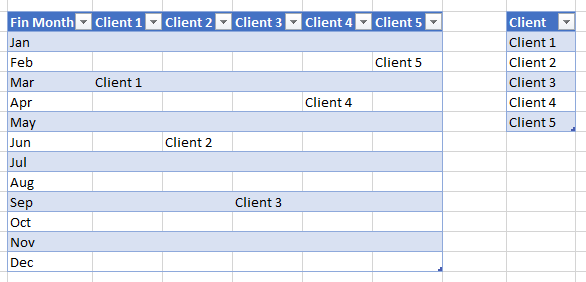
we have more then 30+ clients and every client have their different financial Start Month as seen in the below screenshot.
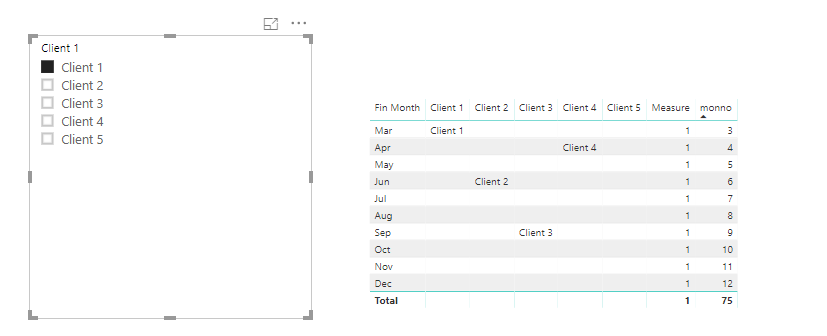
For Example: As seen in the Screenshot if the user select Client 1 the Month should start from Mar likewise Client 2 is selected the Month should start Jun etc. I want to create a dynamic column to sort the financial month.
Any Help would be appreciated. Thanks
Regards
Suhel
Solved! Go to Solution.
Hi @Anonymous ,
Please check the following steps as below.
1. Create a calculated column as below.
monno =
SWITCH (
Table1[Fin Month],
"Jan", 1,
"Feb", 2,
"Mar", 3,
"Apr", 4,
"May", 5,
"Jun", 6,
"Jul", 7,
"Aug", 8,
"Sep", 9,
"Oct", 10,
"Nov", 11,
"Dec", 12
)
2. Create a measure to get the excepted result.
Measure =
VAR sel =
SELECTEDVALUE ( 'Table'[Client 1] )
VAR a =
CALCULATE (
MAX ( Table1[monno] ),
FILTER (
ALL ( Table1 ),
Table1[Client 1] = sel
|| Table1[Client 2] = sel
|| Table1[Client 3] = sel
|| Table1[Client 4] = sel
|| Table1[Client 5] = sel
)
)
RETURN
IF ( MAX ( Table1[monno] ) >= a, 1, 0 )
Vote for your favorite vizzies from the Power BI World Championship submissions!
If you love stickers, then you will definitely want to check out our Community Sticker Challenge!
Check out the January 2026 Power BI update to learn about new features.
| User | Count |
|---|---|
| 56 | |
| 53 | |
| 42 | |
| 16 | |
| 16 |
| User | Count |
|---|---|
| 109 | |
| 105 | |
| 39 | |
| 36 | |
| 26 |