We've captured the moments from FabCon & SQLCon that everyone is talking about, and we are bringing them to the community, live and on-demand. Starts on April 14th. Register now
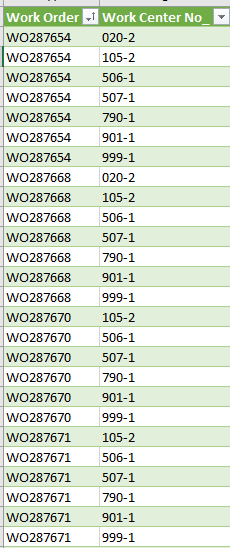
I have an SQL query that returns two columns with multiple values and I need to format it into a key value from the first column with multiple columns made from the values in the second column. I've looked and tried various methods (including pivot/unpivot) in Excel, SQL and Power BI. I'm hoping someone here can point me in the right direction for one of those. Here is a sample of the data being returned:
What needs to happen is this:
There may be 1 WC or there may be up to 21 (I believe). The current report -done through another product - shows up to 5.
Solved! Go to Solution.
Check this out:
Did I answer your question correctly? Mark my answer as a solution!
Proud to be a Datanaut!
Check this out:
Did I answer your question correctly? Mark my answer as a solution!
Proud to be a Datanaut!
Wow, that is exactly what I need. Just I don't know how to add M Code to my file. I'm assuming it's in the Power Query.
Once you are in Power Query, you can go to the advanced editor. That is where the code is pasted
Did I answer your question correctly? Mark my answer as a solution!
Proud to be a Datanaut!
I thought so but hadn't tried it yet. Woot it worked! I would buy you the beverage of your choice if I could.
If you have recently started exploring Fabric, we'd love to hear how it's going. Your feedback can help with product improvements.
A new Power BI DataViz World Championship is coming this June! Don't miss out on submitting your entry.
Share feedback directly with Fabric product managers, participate in targeted research studies and influence the Fabric roadmap.
| User | Count |
|---|---|
| 54 | |
| 39 | |
| 32 | |
| 17 | |
| 15 |
| User | Count |
|---|---|
| 64 | |
| 63 | |
| 37 | |
| 36 | |
| 22 |