Don't miss your chance to take the Fabric Data Engineer (DP-600) exam for FREE! Find out how by attending the DP-600 session on April 23rd (pacific time), live or on-demand.
Learn moreNext up in the FabCon + SQLCon recap series: The roadmap for Microsoft SQL and Maximizing Developer experiences in Fabric. All sessions are available on-demand after the live show. Register now
Hello @all
Example Table1:
| Column1 |
| 13 |
| 13 |
| 13 |
| 15 |
| 18 |
| 3 |
| 14 |
| 2 |
| 2 |
| 2 |
| 18 |
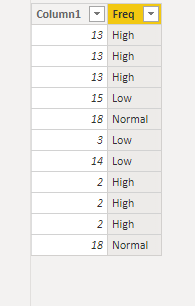
From the above table, I want to identify the multiple occurrences(Frequency) of a value.
for eg in the case of "13" frequency should be "High" as it has more than two occurrences, "3" should have "Low" freq as it has only one occurrence and 18 should have "Normal" freq as it has two occurrences.
Please help resolve this issue.
Regards,
Mintu Baruah
Solved! Go to Solution.
@MintuBaruah
Add a column and use it on a visual
Freq =
var __v = Table3[Column1]
var __d = CALCULATE(COUNT(Table3[Column1]), Table3[Column1] = __v)
return
SWITCH(
TRUE(),
__d > 2 , "High",
__d = 2 , "Normal",
__d < 2 , "Low"
)
⭕ Subscribe and learn Power BI from these videos
⚪ Website ⚪ LinkedIn ⚪ PBI User Group
Hi @MintuBaruah ,
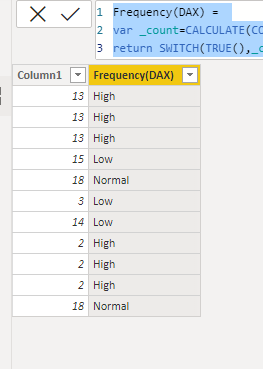
I did it in two ways, please check.
Frequency(DAX) =
VAR _count =
CALCULATE ( COUNTROWS ( 'Table' ), ALLEXCEPT ( 'Table', 'Table'[Column1] ) )
RETURN
SWITCH ( TRUE (), _count = 1, "Low", _count = 2, "Normal", _count >= 3, "High" )
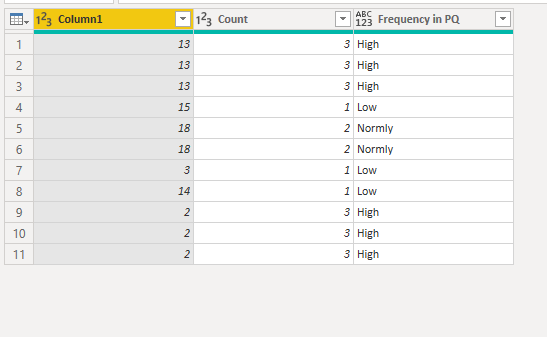
1.Group by
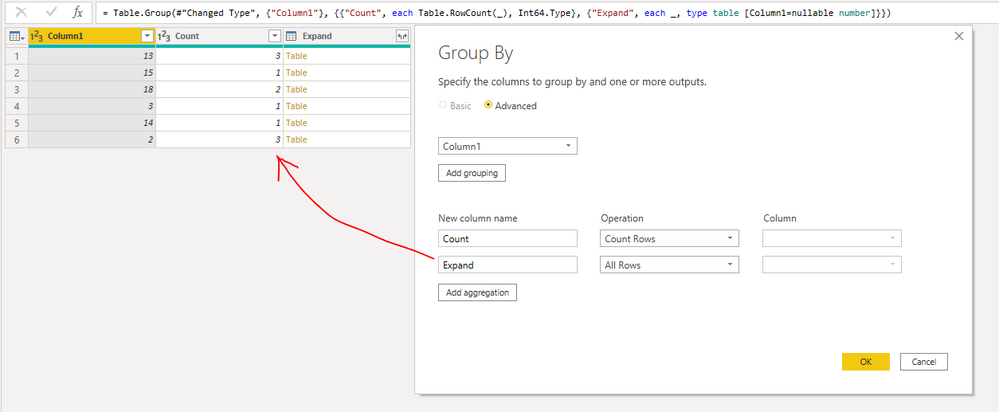
2. Add a Conditional Column:
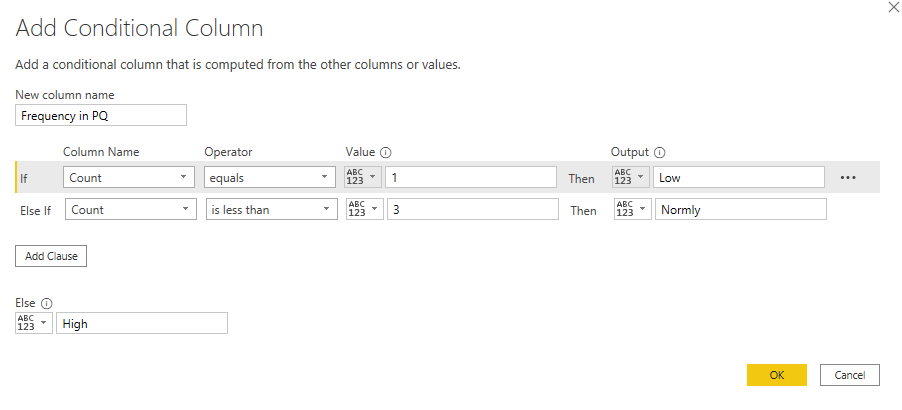
Here is the whole M syntax:
let
Source = Table.FromRows(Json.Document(Binary.Decompress(Binary.FromText("i45WMjRWitXBoEwhlAWYgoqZgCkjDBKkKhYA", BinaryEncoding.Base64), Compression.Deflate)), let _t = ((type nullable text) meta [Serialized.Text = true]) in type table [Column1 = _t]),
#"Changed Type" = Table.TransformColumnTypes(Source,{{"Column1", Int64.Type}}),
#"Grouped Rows" = Table.Group(#"Changed Type", {"Column1"}, {{"Count", each Table.RowCount(_), Int64.Type}, {"Expand", each _, type table [Column1=nullable number]}}),
#"Expanded Expand" = Table.ExpandTableColumn(#"Grouped Rows", "Expand", {"Column1"}, {"Column1.1"}),
#"Removed Columns" = Table.RemoveColumns(#"Expanded Expand",{"Column1.1"}),
#"Added Custom" = Table.AddColumn(#"Removed Columns", "Frequency in PQ", each if [Count] = 1 then "Low" else if [Count] < 3 then "Normly" else "High")
in
#"Added Custom"
Best Regards,
Eyelyn Qin
If this post helps, then please consider Accept it as the solution to help the other members find it more quickly.
@MintuBaruah
Did you try the suggested solution? If it works for you, please Accept it as a Solution, it will be useful for other users as well.
Do let me know if you have any queries
⭕ Subscribe and learn Power BI from these videos
⚪ Website ⚪ LinkedIn ⚪ PBI User Group
Hi @MintuBaruah ,
I did it in two ways, please check.
Frequency(DAX) =
VAR _count =
CALCULATE ( COUNTROWS ( 'Table' ), ALLEXCEPT ( 'Table', 'Table'[Column1] ) )
RETURN
SWITCH ( TRUE (), _count = 1, "Low", _count = 2, "Normal", _count >= 3, "High" )
1.Group by
2. Add a Conditional Column:
Here is the whole M syntax:
let
Source = Table.FromRows(Json.Document(Binary.Decompress(Binary.FromText("i45WMjRWitXBoEwhlAWYgoqZgCkjDBKkKhYA", BinaryEncoding.Base64), Compression.Deflate)), let _t = ((type nullable text) meta [Serialized.Text = true]) in type table [Column1 = _t]),
#"Changed Type" = Table.TransformColumnTypes(Source,{{"Column1", Int64.Type}}),
#"Grouped Rows" = Table.Group(#"Changed Type", {"Column1"}, {{"Count", each Table.RowCount(_), Int64.Type}, {"Expand", each _, type table [Column1=nullable number]}}),
#"Expanded Expand" = Table.ExpandTableColumn(#"Grouped Rows", "Expand", {"Column1"}, {"Column1.1"}),
#"Removed Columns" = Table.RemoveColumns(#"Expanded Expand",{"Column1.1"}),
#"Added Custom" = Table.AddColumn(#"Removed Columns", "Frequency in PQ", each if [Count] = 1 then "Low" else if [Count] < 3 then "Normly" else "High")
in
#"Added Custom"
Best Regards,
Eyelyn Qin
If this post helps, then please consider Accept it as the solution to help the other members find it more quickly.
@MintuBaruah
Add a column and use it on a visual
Freq =
var __v = Table3[Column1]
var __d = CALCULATE(COUNT(Table3[Column1]), Table3[Column1] = __v)
return
SWITCH(
TRUE(),
__d > 2 , "High",
__d = 2 , "Normal",
__d < 2 , "Low"
)
⭕ Subscribe and learn Power BI from these videos
⚪ Website ⚪ LinkedIn ⚪ PBI User Group
@MintuBaruah , a measure like
measure = Switch(True(), count(Table[Column1]) >2, "High",
count(Table[Column1]) =2, "Normal",
"low"
)
or
measure =
var _1 = calculate(count(Table[Column1]),allexcept(Table, Table[Column1])
return
Switch(True(), _1>2, "High",
_1=2, "Normal",
"low"
)
If you have recently started exploring Fabric, we'd love to hear how it's going. Your feedback can help with product improvements.
A new Power BI DataViz World Championship is coming this June! Don't miss out on submitting your entry.
Experience the highlights from FabCon & SQLCon, available live and on-demand starting April 14th.
| User | Count |
|---|---|
| 48 | |
| 40 | |
| 37 | |
| 20 | |
| 15 |
| User | Count |
|---|---|
| 70 | |
| 67 | |
| 32 | |
| 27 | |
| 25 |