Join us at FabCon Atlanta from March 16 - 20, 2026, for the ultimate Fabric, Power BI, AI and SQL community-led event. Save $200 with code FABCOMM.
Register now!Vote for your favorite vizzies from the Power BI Dataviz World Championship submissions. Vote now!
Hello,
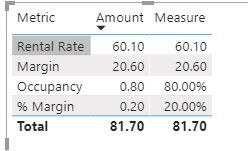
I am having difficulty having multiple number formats in the same column. I had it in the same column for drilling down and filtering purposes from different entities. For example, here is my data. I wanted occupancy rate, % margin to show in percentage whereas rental rate and margin to be in numerical form with one decimal place. Is there any way I could achieve this?
Metric Amount
Occupancy 0.8
Rental Rate 60.1
Margin 20.6
% Margin 0.2
Thanks in advance!
Solved! Go to Solution.
You can create a measure with multiple format.
Measure = SWITCH(MAX('Table'[Metric]),
"Occupancy",FORMAT(SUM('Table'[Amount]),"Percent"),
"% Margin", FORMAT(SUM('Table'[Amount]),"Percent"),
SUM('Table'[Amount]))
Paul Zheng _ Community Support Team
If this post helps, then please consider Accept it as the solution to help the other members find it more quickly.
You can create a measure with multiple format.
Measure = SWITCH(MAX('Table'[Metric]),
"Occupancy",FORMAT(SUM('Table'[Amount]),"Percent"),
"% Margin", FORMAT(SUM('Table'[Amount]),"Percent"),
SUM('Table'[Amount]))
Paul Zheng _ Community Support Team
If this post helps, then please consider Accept it as the solution to help the other members find it more quickly.
This is exactly what I needed and it's a simple solution. Thanks!!
@ehartanto , In that case, you have to return the number from a column in the given format. It might become a text column use format function. refer various format here -https://docs.microsoft.com/en-us/power-bi/desktop-custom-format-strings
A few days back I have seen a video from Guyincube where they used external tools for formatting for measure slicer. Not sure that can work for you.
@ehartanto Tough one. If it is OK to convert to text, you can use FORMAT to achieve this.
apology if i hijacked this thread. I've managed to do this and happy to share my one. $,%, and many others. got one dynamic columns that dynamically took place for my more than 15 measures.
the one that i can't get around is the Style Icon. like for:
sales - use bar icons
percentage - use arrows growth icons.
and many more.. totally stucked with this :)... any tip? if i have to create my own external.. what research i need?
Vote for your favorite vizzies from the Power BI World Championship submissions!
If you love stickers, then you will definitely want to check out our Community Sticker Challenge!
Check out the January 2026 Power BI update to learn about new features.
| User | Count |
|---|---|
| 56 | |
| 52 | |
| 45 | |
| 17 | |
| 16 |
| User | Count |
|---|---|
| 108 | |
| 108 | |
| 39 | |
| 33 | |
| 25 |