cancel
Showing results for 
Search instead for 
Did you mean: 

July 7 - July 17 | Round 2 of the Power BI Dataviz World Championships. Don't miss your chance! Learn more

Reply
ehartanto
Frequent Visitor

Multiple Number Format in the Same Column

Hello, 


I am having difficulty having multiple number formats in the same column. I had it in the same column for drilling down and filtering purposes from different entities. For example, here is my data. I wanted occupancy rate, % margin to show in percentage whereas rental rate and margin to be in numerical form with one decimal place. Is there any way I could achieve this?

Metric                  Amount
Occupancy           0.8

Rental Rate          60.1

Margin                 20.6
% Margin             0.2


Thanks in advance!

1 ACCEPTED SOLUTION
Anonymous
Not applicable

@ehartanto 

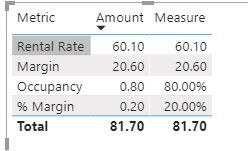
You can create a measure with multiple format.

Measure = SWITCH(MAX('Table'[Metric]),
"Occupancy",FORMAT(SUM('Table'[Amount]),"Percent"),
"% Margin", FORMAT(SUM('Table'[Amount]),"Percent"),
SUM('Table'[Amount]))

mult formate measure.JPG


Paul Zheng _ Community Support Team
If this post helps, then please consider Accept it as the solution to help the other members find it more quickly.

View solution in original post

5 REPLIES 5
Anonymous
Not applicable

@ehartanto 

You can create a measure with multiple format.

Measure = SWITCH(MAX('Table'[Metric]),
"Occupancy",FORMAT(SUM('Table'[Amount]),"Percent"),
"% Margin", FORMAT(SUM('Table'[Amount]),"Percent"),
SUM('Table'[Amount]))

mult formate measure.JPG


Paul Zheng _ Community Support Team
If this post helps, then please consider Accept it as the solution to help the other members find it more quickly.

This is exactly what I needed and it's a simple solution. Thanks!!

amitchandak
Super User
Super User

@ehartanto , In that case, you have to return the number from a column in the given format. It might become a text column use format function.  refer various format here -https://docs.microsoft.com/en-us/power-bi/desktop-custom-format-strings


A few days back I have seen a video from Guyincube where they used external tools for formatting for measure slicer. Not sure that can work for you.

https://www.youtube.com/watch?v=vlnx7QUVYME

Share with Power BI Enthusiasts: Full Power BI Video (20 Hours) YouTube
Microsoft Fabric Series 60+ Videos YouTube
Microsoft Fabric Hindi End to End YouTube
Greg_Deckler
Community Champion
Community Champion

@ehartanto Tough one. If it is OK to convert to text, you can use FORMAT to achieve this.


Follow on LinkedIn
@ me in replies or I'll lose your thread!!!
Instead of a Kudo, please vote for this idea
Become an expert!: Enterprise DNA
External Tools: MSHGQM
YouTube Channel!: Microsoft Hates Greg
Latest book!:
DAX For Humans

DAX is easy, CALCULATE makes DAX hard...

apology if i hijacked this thread. I've managed to do this and happy to share my one. $,%, and many others. got one dynamic columns that dynamically took place for my more than 15 measures.


the one that i can't get around is the Style Icon. like for:

sales - use bar icons

percentage - use arrows growth icons.

and many more.. totally stucked with this :)... any tip? if i have to create my own external.. what research i need?

Helpful resources

Announcements
FabCon and SQLCon Barcelona 2026

FabCon & SQLCon – Barcelona 2026

Join us in Barcelona for FabCon and SQLCon, the Fabric, Power BI, SQL, and AI community event. Save €200 with code FABCMTY200.

60 days of Data Days Carousel

Data Days 2026

Join Fabric Data Days 2026: 60 days of free live/on-demand sessions, challenges, study groups, and certification opportunities.

Power BI DataViz World Championships carousel

Power BI DataViz World Championships - June 2026

A new Power BI DataViz World Championship is coming this June! Don't miss out on submitting your entry.