cancel
Showing results for 
Search instead for 
Did you mean: 

The Power BI Data Visualization World Championships is back! Get ahead of the game and start preparing now! Learn more

Reply
sabeensp
Helper IV
Helper IV

Multiple Measure gives same result

Hello,  I have 2 Tables


Fact_Table

AgeGroup-- Facility -- Other fields


Dim_Facility Table

Facility -- -- Organization


1 Organization has Multiple Facilities - Facility can belong to only 1 organization


I have 2 slicers on the Report
Organization and Facilities.

I created 2 Measures

Measure1 = CALCULATE(Count(FACT_Table[AgeGroup]),
ALLSELECTED(Dim_Facility[Facilities]))
 
2nd Measure
Measure2 = CALCULATE(Count(FACT_Table[AgeGroup]),
ALLSELECTED(Dim_Facility[Organization]))
Both Measure give me the same result:

What I need is this. Users selects the Organization and then Multiple or Single Facilities
first Measure should give COUNT of Entire organization of the selected Facility and
2nd measure give me the Count of Selected Facilities.
 
So, If Organization "A" has Filicities 1,2,3,4,5,6, .. and so on
User selects Oranization "A" -- 1st measure gives
COUNT of (1 + 2, + 3 + 4 and so on Organization)
 
User Selects Facility "1" and "5" -- 2nd Measuer gives
COUNT of (1 + 5)
How do I tweak the measures, I don't know.
Thanks in advance.


1 ACCEPTED SOLUTION
TeigeGao
Solution Sage
Solution Sage

Hi @sabeensp ,

In your scenario, we need to create two other tables which only contains Organization and Facility for the slicer, these two tables has no relationship with the original two tables, then we can create the following measures:

Measure =
CALCULATE (
    COUNT ( Fact_Table[AgeGroup] ),
    FILTER (
        ALL ( Dim_Facility ),
        Dim_Facility[Facility] IN ALLSELECTED ( Facility[Facility] )
    )
)

Measure 2 =
CALCULATE (
    COUNT ( Fact_Table[AgeGroup] ),
    FILTER (
        ALL ( Dim_Facility ),
        Dim_Facility[Organization] IN ALLSELECTED ( Organization[Organization] )
    )
)

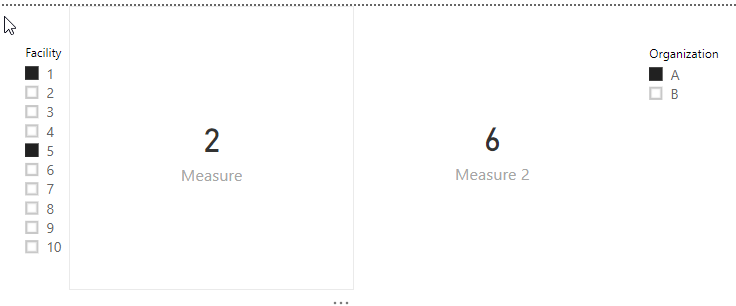
The result will like below:

PBIDesktop_NavB3jf15t.png

Best Regards,

Teige

View solution in original post

2 REPLIES 2
TeigeGao
Solution Sage
Solution Sage

Hi @sabeensp ,

In your scenario, we need to create two other tables which only contains Organization and Facility for the slicer, these two tables has no relationship with the original two tables, then we can create the following measures:

Measure =
CALCULATE (
    COUNT ( Fact_Table[AgeGroup] ),
    FILTER (
        ALL ( Dim_Facility ),
        Dim_Facility[Facility] IN ALLSELECTED ( Facility[Facility] )
    )
)

Measure 2 =
CALCULATE (
    COUNT ( Fact_Table[AgeGroup] ),
    FILTER (
        ALL ( Dim_Facility ),
        Dim_Facility[Organization] IN ALLSELECTED ( Organization[Organization] )
    )
)

The result will like below:

PBIDesktop_NavB3jf15t.png

Best Regards,

Teige

@TeigeGao Thanks, will give it a shot

Helpful resources

Announcements
Power BI DataViz World Championships

Power BI Dataviz World Championships

The Power BI Data Visualization World Championships is back! Get ahead of the game and start preparing now!

December 2025 Power BI Update Carousel

Power BI Monthly Update - December 2025

Check out the December 2025 Power BI Holiday Recap!

FabCon Atlanta 2026 carousel

FabCon Atlanta 2026

Join us at FabCon Atlanta, March 16-20, for the ultimate Fabric, Power BI, AI and SQL community-led event. Save $200 with code FABCOMM.